Add a Coordinate System: Difference between revisions
No edit summary |
No edit summary |
||
| (8 intermediate revisions by 4 users not shown) | |||
| Line 1: | Line 1: | ||
{{Note| Which coordinate systems that are available for usage is '''not''' stored in the {{IMSMANG}} database. Therefore adding coordinate system must be done on all computers in the Mine Action programme.}} | |||
<ol> | <ol> | ||
<li> | <li>In the '''Customisation''' menu →'''Coordinate System Manager'''. | ||
<li> Click the [[File: | [[Image:UserManual CoordinateSystemManagerWindow.png|450px|center]]<br/> | ||
.</li> | <li> Click the [[File:FieldTemplateIcon.png|20px]] button. </li> | ||
[[File: | [[File:Available Coordinate Systems Window.png|340px|center]] <br/> | ||
<li>Select the coordinate system that you would like to add.</li> | <li>Select the coordinate system that you would like to add.</li> | ||
<li>Click the '''Submit''' button. The selected coordinate system displays in the Coordinate System Manager window.</li> | <li>Click the '''Submit''' button. The selected coordinate system displays in the Coordinate System Manager window.</li> | ||
</ol> | </ol> | ||
{{Note|If the coordinate system is not in the list of available coordinate systems, copy the .prj file into the appropriate folder of ''C:\IMSMAng\server\gis\coordinate systems''. Now it is available for selection in the list of available coordinate systems. }} | |||
{{NavBox HowTo Setting up Maps}} | {{NavBox HowTo Setting up Maps}} | ||
[[Category:CRI]] | |||
Latest revision as of 17:32, 15 June 2017
 |
Which coordinate systems that are available for usage is not stored in the IMSMANG database. Therefore adding coordinate system must be done on all computers in the Mine Action programme. |
- In the Customisation menu →Coordinate System Manager.
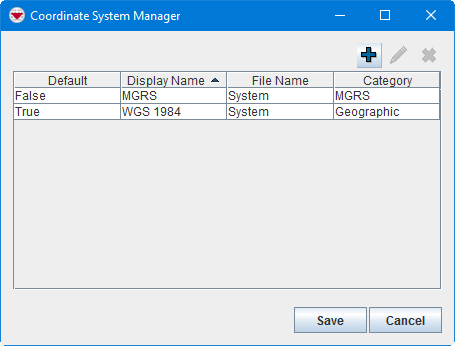
- Click the
 button.
 - Select the coordinate system that you would like to add.
- Click the Submit button. The selected coordinate system displays in the Coordinate System Manager window.


|
If the coordinate system is not in the list of available coordinate systems, copy the .prj file into the appropriate folder of C:\IMSMAng\server\gis\coordinate systems. Now it is available for selection in the list of available coordinate systems. |
{{#switch:|subgroup|child=|none=|#default=
{{#if:|<th scope="col" style="border-left:2px solid #fdfdfd;width:100%;|}}{{#if:|{{#if:Customising IMSMANG|}}}}{{#if:{{#switch:{{#if:|{{{border}}}|child}}|subgroup|child=|none=|#default=| }}<table cellspacing="0" class="nowraplinks hlist {{#if:Customising IMSMANG|{{#switch:autocollapse|plain|off=|#default=collapsible {{#if:autocollapse|autocollapse|autocollapse}}}}}} {{#switch:|subgroup|child|none=navbox-subgroup" style="border-spacing:0;;|#default=navbox-inner" style="border-spacing:0;background:transparent;color:inherit}};;">{{#if:Customising IMSMANG| | |
{{{above}}} |
| }}{{#if:|{{#if:|<th scope="col" style="border-left:2px solid #fdfdfd;width:100%;|}}{{#if:|{{#if:|}}}}{{#if:Import an IMSMA Map · Modify an IMSMA Map|{{#if:|}}{{#if:|}}{{#if:{{#if:Background map| Background map }}|<td style="text-align:left;border-left-width:2px;border-left-style:solid;|{{#if:|}}}}{{#if:Change existing symbol in IMSMA.mxd · Add a new symbol to IMSMA.mxd · Change Visible Scale Range · How to make polygons look different in IMSMA.mxd · Customise Sub-Themes in IMSMA · How to work with Sub-Themes in IMSMA.mxd|{{#if:Import an IMSMA Map · Modify an IMSMA Map|}}{{#if:{{#if:IMSMA.mxd|}}|<td style="text-align:left;border-left-width:2px;border-left-style:solid;|}}{{#if:Add a Coordinate System · Change the Display Name of a Coordinate System · Delete a Coordinate System · Set Default Coordinate System|{{#if:Import an IMSMA Map · Modify an IMSMA MapChange existing symbol in IMSMA.mxd · Add a new symbol to IMSMA.mxd · Change Visible Scale Range · How to make polygons look different in IMSMA.mxd · Customise Sub-Themes in IMSMA · How to work with Sub-Themes in IMSMA.mxd|}}{{#if:{{#if:Coordinate system|}}|<td style="text-align:left;border-left-width:2px;border-left-style:solid;|}}{{#if:|{{#if:{{#if:|{{{group4}}} }}|<td style="text-align:left;border-left-width:2px;border-left-style:solid;|}}{{#if:|{{#if:{{#if:|{{{group5}}} }}|<td style="text-align:left;border-left-width:2px;border-left-style:solid;|}}{{#if:|{{#if:{{#if:|{{{group6}}} }}|<td style="text-align:left;border-left-width:2px;border-left-style:solid;|}}{{#if:|{{#if:{{#if:|{{{group7}}} }}|<td style="text-align:left;border-left-width:2px;border-left-style:solid;|}}{{#if:|{{#if:{{#if:|{{{group8}}} }}|<td style="text-align:left;border-left-width:2px;border-left-style:solid;|}}{{#if:|{{#if:{{#if:|{{{group9}}} }}|<td style="text-align:left;border-left-width:2px;border-left-style:solid;|}}{{#if:|{{#if:{{#if:|{{{group10}}} }}|<td style="text-align:left;border-left-width:2px;border-left-style:solid;|}}{{#if:|{{#if:{{#if:|{{{group11}}} }}|<td style="text-align:left;border-left-width:2px;border-left-style:solid;|}}{{#if:|{{#if:{{#if:|{{{group12}}} }}|<td style="text-align:left;border-left-width:2px;border-left-style:solid;|}}{{#if:|{{#if:{{#if:|{{{group13}}} }}|<td style="text-align:left;border-left-width:2px;border-left-style:solid;|}}{{#if:|{{#if:{{#if:|{{{group14}}} }}|<td style="text-align:left;border-left-width:2px;border-left-style:solid;|}}{{#if:|{{#if:{{#if:|{{{group15}}} }}|<td style="text-align:left;border-left-width:2px;border-left-style:solid;|}}{{#if:|{{#if:{{#if:|{{{group16}}} }}|<td style="text-align:left;border-left-width:2px;border-left-style:solid;|}}{{#if:|{{#if:{{#if:|{{{group17}}} }}|<td style="text-align:left;border-left-width:2px;border-left-style:solid;|}}{{#if:|{{#if:{{#if:|{{{group18}}} }}|<td style="text-align:left;border-left-width:2px;border-left-style:solid;|}}{{#if:|{{#if:{{#if:|{{{group19}}} }}|<td style="text-align:left;border-left-width:2px;border-left-style:solid;|}}{{#if:|{{#if:{{#if:|{{{group20}}} }}|<td style="text-align:left;border-left-width:2px;border-left-style:solid;|}}{{#if:|{{#if:Import an IMSMA Map · Modify an IMSMA MapChange existing symbol in IMSMA.mxd · Add a new symbol to IMSMA.mxd · Change Visible Scale Range · How to make polygons look different in IMSMA.mxd · Customise Sub-Themes in IMSMA · How to work with Sub-Themes in IMSMA.mxdAdd a Coordinate System · Change the Display Name of a Coordinate System · Delete a Coordinate System · Set Default Coordinate System|}}}}
|none=|#default= | ||||||||||||||||||||||||||||||||||||||||||||||||||||||||||||||||||||||||||||||||||||||||
}}{{#ifeq:|Template|{{#ifeq:{{#if:|{{{border}}}|child}}|child||{{#ifeq:{{#if:|{{{border}}}|child}}|subgroup||{{#switch:add a coordinate system
|doc
|sandbox
|testcases =
|#default = {{#switch:
 |plainlist
 |hlist
 |hlist hnum
 |hlist vcard
 |vcard hlist =
 |#default =
 }}
}}
}}}}}}|{{#if:Customising IMSMANG|}}{{#if:|
}}{{#if:Setting-up Maps and Coordinate Systems|Setting-up Maps and Coordinate Systems<td style="text-align:left;border-left-width:2px;border-left-style:solid;|
|none=|#default=
| }}{{#if:|{{#if:|<th scope="col" style="border-left:2px solid #fdfdfd;width:100%;|}}{{#if:|{{#if:|}}}}{{#if:Import an IMSMA Map · Modify an IMSMA Map|{{#if:|}}{{#if:|}}{{#if:{{#if:Background map| Background map }}|<td style="text-align:left;border-left-width:2px;border-left-style:solid;|{{#if:|}}}}{{#if:Change existing symbol in IMSMA.mxd · Add a new symbol to IMSMA.mxd · Change Visible Scale Range · How to make polygons look different in IMSMA.mxd · Customise Sub-Themes in IMSMA · How to work with Sub-Themes in IMSMA.mxd|{{#if:Import an IMSMA Map · Modify an IMSMA Map|}}{{#if:{{#if:IMSMA.mxd|}}|<td style="text-align:left;border-left-width:2px;border-left-style:solid;|}}{{#if:Add a Coordinate System · Change the Display Name of a Coordinate System · Delete a Coordinate System · Set Default Coordinate System|{{#if:Import an IMSMA Map · Modify an IMSMA MapChange existing symbol in IMSMA.mxd · Add a new symbol to IMSMA.mxd · Change Visible Scale Range · How to make polygons look different in IMSMA.mxd · Customise Sub-Themes in IMSMA · How to work with Sub-Themes in IMSMA.mxd|}}{{#if:{{#if:Coordinate system|}}|<td style="text-align:left;border-left-width:2px;border-left-style:solid;|}}{{#if:|{{#if:{{#if:|{{{group4}}} }}|<td style="text-align:left;border-left-width:2px;border-left-style:solid;|}}{{#if:|{{#if:{{#if:|{{{group5}}} }}|<td style="text-align:left;border-left-width:2px;border-left-style:solid;|}}{{#if:|{{#if:{{#if:|{{{group6}}} }}|<td style="text-align:left;border-left-width:2px;border-left-style:solid;|}}{{#if:|{{#if:{{#if:|{{{group7}}} }}|<td style="text-align:left;border-left-width:2px;border-left-style:solid;|}}{{#if:|{{#if:{{#if:|{{{group8}}} }}|<td style="text-align:left;border-left-width:2px;border-left-style:solid;|}}{{#if:|{{#if:{{#if:|{{{group9}}} }}|<td style="text-align:left;border-left-width:2px;border-left-style:solid;|}}{{#if:|{{#if:{{#if:|{{{group10}}} }}|<td style="text-align:left;border-left-width:2px;border-left-style:solid;|}}{{#if:|{{#if:{{#if:|{{{group11}}} }}|<td style="text-align:left;border-left-width:2px;border-left-style:solid;|}}{{#if:|{{#if:{{#if:|{{{group12}}} }}|<td style="text-align:left;border-left-width:2px;border-left-style:solid;|}}{{#if:|{{#if:{{#if:|{{{group13}}} }}|<td style="text-align:left;border-left-width:2px;border-left-style:solid;|}}{{#if:|{{#if:{{#if:|{{{group14}}} }}|<td style="text-align:left;border-left-width:2px;border-left-style:solid;|}}{{#if:|{{#if:{{#if:|{{{group15}}} }}|<td style="text-align:left;border-left-width:2px;border-left-style:solid;|}}{{#if:|{{#if:{{#if:|{{{group16}}} }}|<td style="text-align:left;border-left-width:2px;border-left-style:solid;|}}{{#if:|{{#if:{{#if:|{{{group17}}} }}|<td style="text-align:left;border-left-width:2px;border-left-style:solid;|}}{{#if:|{{#if:{{#if:|{{{group18}}} }}|<td style="text-align:left;border-left-width:2px;border-left-style:solid;|}}{{#if:|{{#if:{{#if:|{{{group19}}} }}|<td style="text-align:left;border-left-width:2px;border-left-style:solid;|}}{{#if:|{{#if:{{#if:|{{{group20}}} }}|<td style="text-align:left;border-left-width:2px;border-left-style:solid;|}}{{#if:|{{#if:Import an IMSMA Map · Modify an IMSMA MapChange existing symbol in IMSMA.mxd · Add a new symbol to IMSMA.mxd · Change Visible Scale Range · How to make polygons look different in IMSMA.mxd · Customise Sub-Themes in IMSMA · How to work with Sub-Themes in IMSMA.mxdAdd a Coordinate System · Change the Display Name of a Coordinate System · Delete a Coordinate System · Set Default Coordinate System|}}}}
|none=|#default= | ||||||||||||||||||||||||||||||||||||||||||||||||||||||||||||||||||||||||||||||||||||||||
}}{{#ifeq:|Template|{{#ifeq:{{#if:|{{{border}}}|child}}|child||{{#ifeq:{{#if:|{{{border}}}|child}}|subgroup||{{#switch:add a coordinate system
|doc
|sandbox
|testcases =
|#default = {{#switch:
 |plainlist
 |hlist
 |hlist hnum
 |hlist vcard
 |vcard hlist =
 |#default =
 }}
}}
}}}}}}{{#if:|
}}}}{{#if:|{{#if:Customising IMSMANG{{#switch:{{#if:|{{{border}}}|child}}|subgroup|child=|none=|#default=
| }}{{#if:|{{#if:|<th scope="col" style="border-left:2px solid #fdfdfd;width:100%;|}}{{#if:|{{#if:|}}}}{{#if:Import an IMSMA Map · Modify an IMSMA Map|{{#if:|}}{{#if:|}}{{#if:{{#if:Background map| Background map }}|<td style="text-align:left;border-left-width:2px;border-left-style:solid;|{{#if:|}}}}{{#if:Change existing symbol in IMSMA.mxd · Add a new symbol to IMSMA.mxd · Change Visible Scale Range · How to make polygons look different in IMSMA.mxd · Customise Sub-Themes in IMSMA · How to work with Sub-Themes in IMSMA.mxd|{{#if:Import an IMSMA Map · Modify an IMSMA Map|}}{{#if:{{#if:IMSMA.mxd|}}|<td style="text-align:left;border-left-width:2px;border-left-style:solid;|}}{{#if:Add a Coordinate System · Change the Display Name of a Coordinate System · Delete a Coordinate System · Set Default Coordinate System|{{#if:Import an IMSMA Map · Modify an IMSMA MapChange existing symbol in IMSMA.mxd · Add a new symbol to IMSMA.mxd · Change Visible Scale Range · How to make polygons look different in IMSMA.mxd · Customise Sub-Themes in IMSMA · How to work with Sub-Themes in IMSMA.mxd|}}{{#if:{{#if:Coordinate system|}}|<td style="text-align:left;border-left-width:2px;border-left-style:solid;|}}{{#if:|{{#if:{{#if:|{{{group4}}} }}|<td style="text-align:left;border-left-width:2px;border-left-style:solid;|}}{{#if:|{{#if:{{#if:|{{{group5}}} }}|<td style="text-align:left;border-left-width:2px;border-left-style:solid;|}}{{#if:|{{#if:{{#if:|{{{group6}}} }}|<td style="text-align:left;border-left-width:2px;border-left-style:solid;|}}{{#if:|{{#if:{{#if:|{{{group7}}} }}|<td style="text-align:left;border-left-width:2px;border-left-style:solid;|}}{{#if:|{{#if:{{#if:|{{{group8}}} }}|<td style="text-align:left;border-left-width:2px;border-left-style:solid;|}}{{#if:|{{#if:{{#if:|{{{group9}}} }}|<td style="text-align:left;border-left-width:2px;border-left-style:solid;|}}{{#if:|{{#if:{{#if:|{{{group10}}} }}|<td style="text-align:left;border-left-width:2px;border-left-style:solid;|}}{{#if:|{{#if:{{#if:|{{{group11}}} }}|<td style="text-align:left;border-left-width:2px;border-left-style:solid;|}}{{#if:|{{#if:{{#if:|{{{group12}}} }}|<td style="text-align:left;border-left-width:2px;border-left-style:solid;|}}{{#if:|{{#if:{{#if:|{{{group13}}} }}|<td style="text-align:left;border-left-width:2px;border-left-style:solid;|}}{{#if:|{{#if:{{#if:|{{{group14}}} }}|<td style="text-align:left;border-left-width:2px;border-left-style:solid;|}}{{#if:|{{#if:{{#if:|{{{group15}}} }}|<td style="text-align:left;border-left-width:2px;border-left-style:solid;|}}{{#if:|{{#if:{{#if:|{{{group16}}} }}|<td style="text-align:left;border-left-width:2px;border-left-style:solid;|}}{{#if:|{{#if:{{#if:|{{{group17}}} }}|<td style="text-align:left;border-left-width:2px;border-left-style:solid;|}}{{#if:|{{#if:{{#if:|{{{group18}}} }}|<td style="text-align:left;border-left-width:2px;border-left-style:solid;|}}{{#if:|{{#if:{{#if:|{{{group19}}} }}|<td style="text-align:left;border-left-width:2px;border-left-style:solid;|}}{{#if:|{{#if:{{#if:|{{{group20}}} }}|<td style="text-align:left;border-left-width:2px;border-left-style:solid;|}}{{#if:|{{#if:Import an IMSMA Map · Modify an IMSMA MapChange existing symbol in IMSMA.mxd · Add a new symbol to IMSMA.mxd · Change Visible Scale Range · How to make polygons look different in IMSMA.mxd · Customise Sub-Themes in IMSMA · How to work with Sub-Themes in IMSMA.mxdAdd a Coordinate System · Change the Display Name of a Coordinate System · Delete a Coordinate System · Set Default Coordinate System|}}}}
|none=|#default= | ||||||||||||||||||||||||||||||||||||||||||||||||||||||||||||||||||||||||||||||||||||||||
}}{{#ifeq:|Template|{{#ifeq:{{#if:|{{{border}}}|child}}|child||{{#ifeq:{{#if:|{{{border}}}|child}}|subgroup||{{#switch:add a coordinate system
|doc
|sandbox
|testcases =
|#default = {{#switch:
 |plainlist
 |hlist
 |hlist hnum
 |hlist vcard
 |vcard hlist =
 |#default =
 }}
}}
}}}}}}|}}{{#if:|{{{group2}}}<td style="text-align:left;border-left-width:2px;border-left-style:solid;|
}}{{#if:|{{#if:Customising IMSMANG{{#switch:{{#if:|{{{border}}}|child}}|subgroup|child=|none=|#default=
| }}{{#if:|{{#if:|<th scope="col" style="border-left:2px solid #fdfdfd;width:100%;|}}{{#if:|{{#if:|}}}}{{#if:Import an IMSMA Map · Modify an IMSMA Map|{{#if:|}}{{#if:|}}{{#if:{{#if:Background map| Background map }}|<td style="text-align:left;border-left-width:2px;border-left-style:solid;|{{#if:|}}}}{{#if:Change existing symbol in IMSMA.mxd · Add a new symbol to IMSMA.mxd · Change Visible Scale Range · How to make polygons look different in IMSMA.mxd · Customise Sub-Themes in IMSMA · How to work with Sub-Themes in IMSMA.mxd|{{#if:Import an IMSMA Map · Modify an IMSMA Map|}}{{#if:{{#if:IMSMA.mxd|}}|<td style="text-align:left;border-left-width:2px;border-left-style:solid;|}}{{#if:Add a Coordinate System · Change the Display Name of a Coordinate System · Delete a Coordinate System · Set Default Coordinate System|{{#if:Import an IMSMA Map · Modify an IMSMA MapChange existing symbol in IMSMA.mxd · Add a new symbol to IMSMA.mxd · Change Visible Scale Range · How to make polygons look different in IMSMA.mxd · Customise Sub-Themes in IMSMA · How to work with Sub-Themes in IMSMA.mxd|}}{{#if:{{#if:Coordinate system|}}|<td style="text-align:left;border-left-width:2px;border-left-style:solid;|}}{{#if:|{{#if:{{#if:|{{{group4}}} }}|<td style="text-align:left;border-left-width:2px;border-left-style:solid;|}}{{#if:|{{#if:{{#if:|{{{group5}}} }}|<td style="text-align:left;border-left-width:2px;border-left-style:solid;|}}{{#if:|{{#if:{{#if:|{{{group6}}} }}|<td style="text-align:left;border-left-width:2px;border-left-style:solid;|}}{{#if:|{{#if:{{#if:|{{{group7}}} }}|<td style="text-align:left;border-left-width:2px;border-left-style:solid;|}}{{#if:|{{#if:{{#if:|{{{group8}}} }}|<td style="text-align:left;border-left-width:2px;border-left-style:solid;|}}{{#if:|{{#if:{{#if:|{{{group9}}} }}|<td style="text-align:left;border-left-width:2px;border-left-style:solid;|}}{{#if:|{{#if:{{#if:|{{{group10}}} }}|<td style="text-align:left;border-left-width:2px;border-left-style:solid;|}}{{#if:|{{#if:{{#if:|{{{group11}}} }}|<td style="text-align:left;border-left-width:2px;border-left-style:solid;|}}{{#if:|{{#if:{{#if:|{{{group12}}} }}|<td style="text-align:left;border-left-width:2px;border-left-style:solid;|}}{{#if:|{{#if:{{#if:|{{{group13}}} }}|<td style="text-align:left;border-left-width:2px;border-left-style:solid;|}}{{#if:|{{#if:{{#if:|{{{group14}}} }}|<td style="text-align:left;border-left-width:2px;border-left-style:solid;|}}{{#if:|{{#if:{{#if:|{{{group15}}} }}|<td style="text-align:left;border-left-width:2px;border-left-style:solid;|}}{{#if:|{{#if:{{#if:|{{{group16}}} }}|<td style="text-align:left;border-left-width:2px;border-left-style:solid;|}}{{#if:|{{#if:{{#if:|{{{group17}}} }}|<td style="text-align:left;border-left-width:2px;border-left-style:solid;|}}{{#if:|{{#if:{{#if:|{{{group18}}} }}|<td style="text-align:left;border-left-width:2px;border-left-style:solid;|}}{{#if:|{{#if:{{#if:|{{{group19}}} }}|<td style="text-align:left;border-left-width:2px;border-left-style:solid;|}}{{#if:|{{#if:{{#if:|{{{group20}}} }}|<td style="text-align:left;border-left-width:2px;border-left-style:solid;|}}{{#if:|{{#if:Import an IMSMA Map · Modify an IMSMA MapChange existing symbol in IMSMA.mxd · Add a new symbol to IMSMA.mxd · Change Visible Scale Range · How to make polygons look different in IMSMA.mxd · Customise Sub-Themes in IMSMA · How to work with Sub-Themes in IMSMA.mxdAdd a Coordinate System · Change the Display Name of a Coordinate System · Delete a Coordinate System · Set Default Coordinate System|}}}}
|none=|#default= | ||||||||||||||||||||||||||||||||||||||||||||||||||||||||||||||||||||||||||||||||||||||||
}}{{#ifeq:|Template|{{#ifeq:{{#if:|{{{border}}}|child}}|child||{{#ifeq:{{#if:|{{{border}}}|child}}|subgroup||{{#switch:add a coordinate system
|doc
|sandbox
|testcases =
|#default = {{#switch:
 |plainlist
 |hlist
 |hlist hnum
 |hlist vcard
 |vcard hlist =
 |#default =
 }}
}}
}}}}}}|}}{{#if:|{{{group3}}}<td style="text-align:left;border-left-width:2px;border-left-style:solid;|
}}{{#if:|{{#if:|{{{group4}}}<td style="text-align:left;border-left-width:2px;border-left-style:solid;|
}}{{#if:|{{#if:|{{{group5}}}<td style="text-align:left;border-left-width:2px;border-left-style:solid;|
}}{{#if:|{{#if:|{{{group6}}}<td style="text-align:left;border-left-width:2px;border-left-style:solid;|
}}{{#if:|{{#if:|{{{group7}}}<td style="text-align:left;border-left-width:2px;border-left-style:solid;|
}}{{#if:|{{#if:|{{{group8}}}<td style="text-align:left;border-left-width:2px;border-left-style:solid;|
}}{{#if:|{{#if:|{{{group9}}}<td style="text-align:left;border-left-width:2px;border-left-style:solid;|
}}{{#if:|{{#if:|{{{group10}}}<td style="text-align:left;border-left-width:2px;border-left-style:solid;|
}}{{#if:|{{#if:|{{{group11}}}<td style="text-align:left;border-left-width:2px;border-left-style:solid;|
}}{{#if:|{{#if:|{{{group12}}}<td style="text-align:left;border-left-width:2px;border-left-style:solid;|
}}{{#if:|{{#if:|{{{group13}}}<td style="text-align:left;border-left-width:2px;border-left-style:solid;|
}}{{#if:|{{#if:|{{{group14}}}<td style="text-align:left;border-left-width:2px;border-left-style:solid;|
}}{{#if:|{{#if:|{{{group15}}}<td style="text-align:left;border-left-width:2px;border-left-style:solid;|
}}{{#if:|{{#if:|{{{group16}}}<td style="text-align:left;border-left-width:2px;border-left-style:solid;|
}}{{#if:|{{#if:|{{{group17}}}<td style="text-align:left;border-left-width:2px;border-left-style:solid;|
}}{{#if:|{{#if:|{{{group18}}}<td style="text-align:left;border-left-width:2px;border-left-style:solid;|
}}{{#if:|{{#if:|{{{group19}}}<td style="text-align:left;border-left-width:2px;border-left-style:solid;|
}}{{#if:|{{#if:|{{{group20}}}<td style="text-align:left;border-left-width:2px;border-left-style:solid;|
}}{{#if:|{{#if:Customising IMSMANG{{#switch:{{#if:|{{{border}}}|child}}|subgroup|child=|none=|#default=
| }}{{#if:|{{#if:|<th scope="col" style="border-left:2px solid #fdfdfd;width:100%;|}}{{#if:|{{#if:|}}}}{{#if:Import an IMSMA Map · Modify an IMSMA Map|{{#if:|}}{{#if:|}}{{#if:{{#if:Background map| Background map }}|<td style="text-align:left;border-left-width:2px;border-left-style:solid;|{{#if:|}}}}{{#if:Change existing symbol in IMSMA.mxd · Add a new symbol to IMSMA.mxd · Change Visible Scale Range · How to make polygons look different in IMSMA.mxd · Customise Sub-Themes in IMSMA · How to work with Sub-Themes in IMSMA.mxd|{{#if:Import an IMSMA Map · Modify an IMSMA Map|}}{{#if:{{#if:IMSMA.mxd|}}|<td style="text-align:left;border-left-width:2px;border-left-style:solid;|}}{{#if:Add a Coordinate System · Change the Display Name of a Coordinate System · Delete a Coordinate System · Set Default Coordinate System|{{#if:Import an IMSMA Map · Modify an IMSMA MapChange existing symbol in IMSMA.mxd · Add a new symbol to IMSMA.mxd · Change Visible Scale Range · How to make polygons look different in IMSMA.mxd · Customise Sub-Themes in IMSMA · How to work with Sub-Themes in IMSMA.mxd|}}{{#if:{{#if:Coordinate system|}}|<td style="text-align:left;border-left-width:2px;border-left-style:solid;|}}{{#if:|{{#if:{{#if:|{{{group4}}} }}|<td style="text-align:left;border-left-width:2px;border-left-style:solid;|}}{{#if:|{{#if:{{#if:|{{{group5}}} }}|<td style="text-align:left;border-left-width:2px;border-left-style:solid;|}}{{#if:|{{#if:{{#if:|{{{group6}}} }}|<td style="text-align:left;border-left-width:2px;border-left-style:solid;|}}{{#if:|{{#if:{{#if:|{{{group7}}} }}|<td style="text-align:left;border-left-width:2px;border-left-style:solid;|}}{{#if:|{{#if:{{#if:|{{{group8}}} }}|<td style="text-align:left;border-left-width:2px;border-left-style:solid;|}}{{#if:|{{#if:{{#if:|{{{group9}}} }}|<td style="text-align:left;border-left-width:2px;border-left-style:solid;|}}{{#if:|{{#if:{{#if:|{{{group10}}} }}|<td style="text-align:left;border-left-width:2px;border-left-style:solid;|}}{{#if:|{{#if:{{#if:|{{{group11}}} }}|<td style="text-align:left;border-left-width:2px;border-left-style:solid;|}}{{#if:|{{#if:{{#if:|{{{group12}}} }}|<td style="text-align:left;border-left-width:2px;border-left-style:solid;|}}{{#if:|{{#if:{{#if:|{{{group13}}} }}|<td style="text-align:left;border-left-width:2px;border-left-style:solid;|}}{{#if:|{{#if:{{#if:|{{{group14}}} }}|<td style="text-align:left;border-left-width:2px;border-left-style:solid;|}}{{#if:|{{#if:{{#if:|{{{group15}}} }}|<td style="text-align:left;border-left-width:2px;border-left-style:solid;|}}{{#if:|{{#if:{{#if:|{{{group16}}} }}|<td style="text-align:left;border-left-width:2px;border-left-style:solid;|}}{{#if:|{{#if:{{#if:|{{{group17}}} }}|<td style="text-align:left;border-left-width:2px;border-left-style:solid;|}}{{#if:|{{#if:{{#if:|{{{group18}}} }}|<td style="text-align:left;border-left-width:2px;border-left-style:solid;|}}{{#if:|{{#if:{{#if:|{{{group19}}} }}|<td style="text-align:left;border-left-width:2px;border-left-style:solid;|}}{{#if:|{{#if:{{#if:|{{{group20}}} }}|<td style="text-align:left;border-left-width:2px;border-left-style:solid;|}}{{#if:|{{#if:Import an IMSMA Map · Modify an IMSMA MapChange existing symbol in IMSMA.mxd · Add a new symbol to IMSMA.mxd · Change Visible Scale Range · How to make polygons look different in IMSMA.mxd · Customise Sub-Themes in IMSMA · How to work with Sub-Themes in IMSMA.mxdAdd a Coordinate System · Change the Display Name of a Coordinate System · Delete a Coordinate System · Set Default Coordinate System|}}}}
|none=|#default= | ||||||||||||||||||||||||||||||||||||||||||||||||||||||||||||||||||||||||||||||||||||||||
}}{{#ifeq:|Template|{{#ifeq:{{#if:|{{{border}}}|child}}|child||{{#ifeq:{{#if:|{{{border}}}|child}}|subgroup||{{#switch:add a coordinate system
|doc
|sandbox
|testcases =
|#default = {{#switch:
 |plainlist
 |hlist
 |hlist hnum
 |hlist vcard
 |vcard hlist =
 |#default =
 }}
}}
}}}}}}|}}
}}{{#switch:|subgroup|child=
|doc
|sandbox
|testcases =
|#default = {{#switch:hlist
 |plainlist
 |hlist
 |hlist hnum
 |hlist vcard
 |vcard hlist =
 |#default =
 }}
}}
}}}}}}