Environment Variables
Jump to navigation
Jump to search
Which Environment variables does IMSMA use?
There are three environment variables that are used by IMSMANG:
- IMSMA_HOME which normally should be set to c:\IMSMAng\
- JAVA_HOME which should be set to where Java 7 is installed e.g. C:\Program Files (x86)\Java\jre7
- AGSENGINEJAVA which should be set to where ArcEngine is installed e.g. C:\Program Files (x86)\ArcGIS\Engine10.1\
 |
Java 7 should be installed on the computer in addition to the Java folder in C:\IMSMAng. It is possible to have Java 8 installed too but JAVA_HOME and PATH must be to Java 7, see ArcEngine/Java issue for instructions. |
Where to find the Environment variables on your coumputer
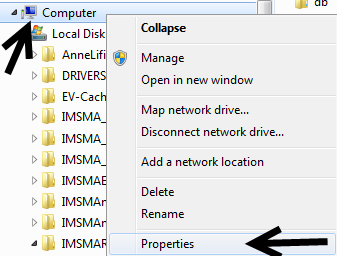
- Go to Windows Explorer and right-click on Computer.
- Choose Properties in the menu.
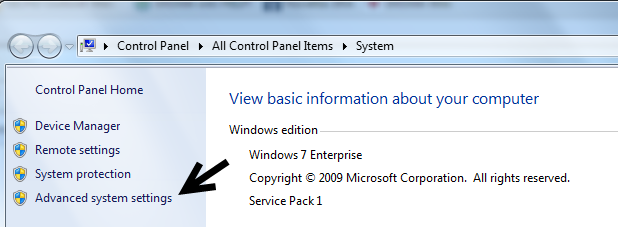
- Choose Advanced system settings in the left pane.
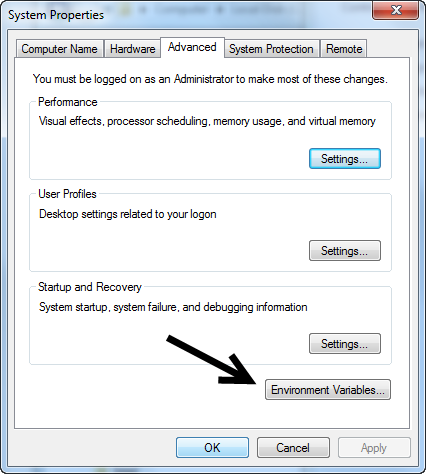
- Click on Environment Variables button.
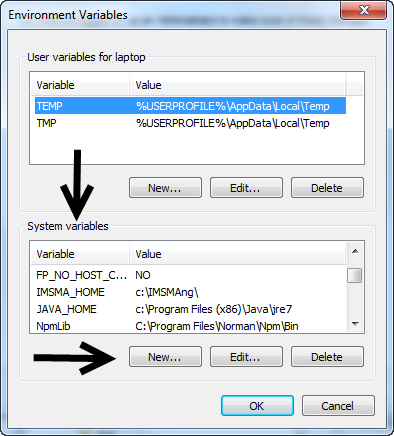
- The Environment variables are in the lower part of the window.
- Use the buttons New and Edit.
Category: