Add Subobject Custom Defined Fields to the Design Pane
Jump to navigation
Jump to search
To add subobject custom defined fields (CDF) to a data entry form template:
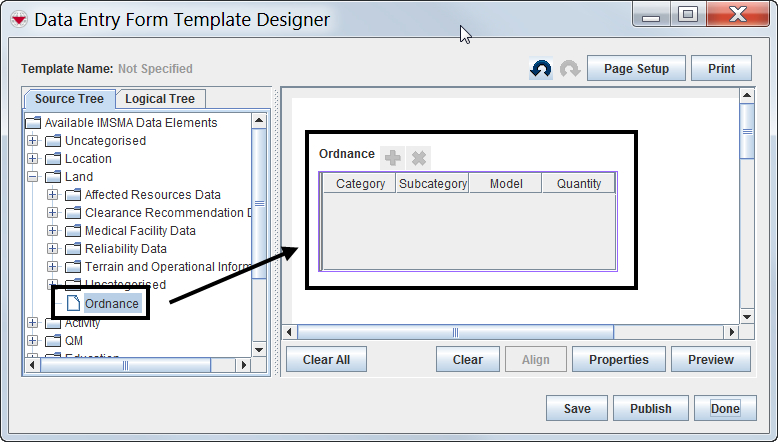
- In the Data Entry Form Template Designer window, select a subobject table from the data tree and drag it to the design pane.
 |
See Add Custom Defined Fields for examples of subobject tables that you can choose from. |
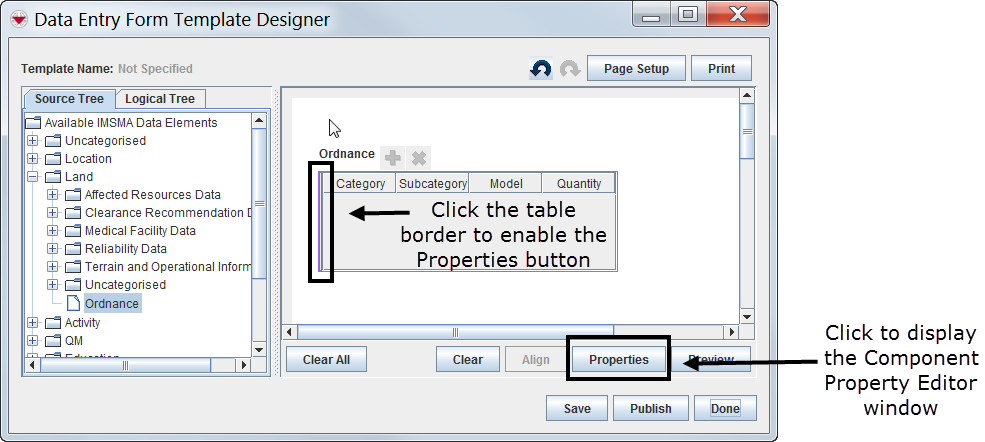
- Click the left border of the subobject table in the design pane, and then click Properties to open the Component Property Editor window.
- Select subobject CDFs the same way you would select display columns, then click OK to close the Component Property Editor window.
|
You must save and publish the data entry form template in order to display the new subobject CDFs. |
| |||||||||||||||||||||||||
Category: