Add Reports in IMSMA
Jump to navigation
Jump to search
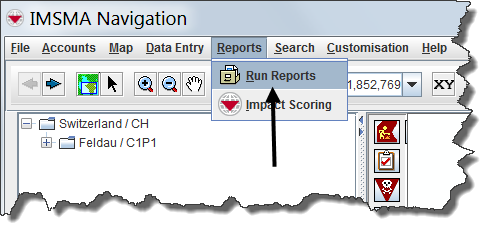
- In the Reports menu → Run Reports.
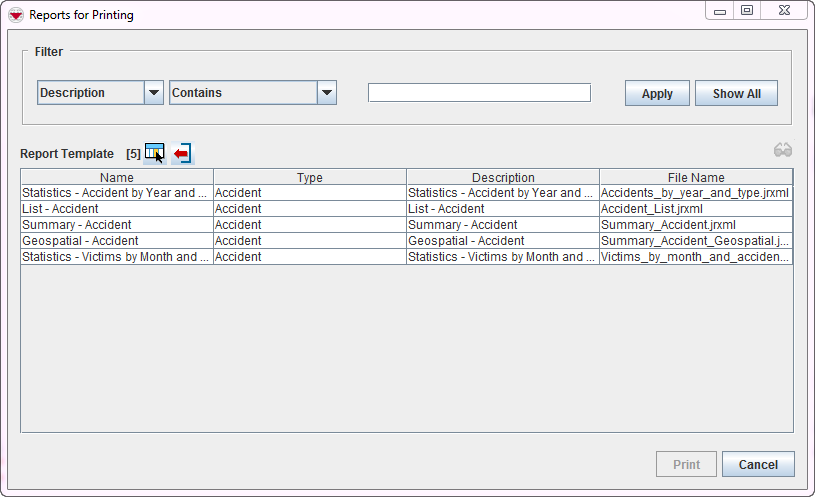
Reports Window Reports Window
- Click the
 button.
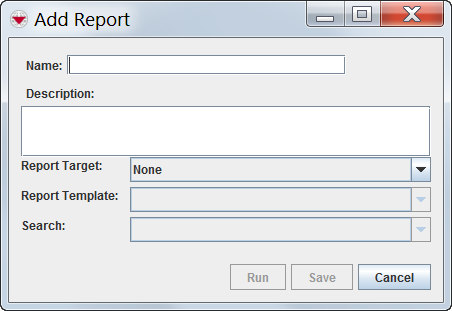
Add Report Window Add Report Window
- Enter a name for the report in the Name field.
- Enter a description for the report in the Description field.
- From the Report Target list, select the item for which you would like to create a report. The Report Template and Search lists are updated to show only those report templates and search definitions for the selected item.
- Select the template that you would like to use for the report from the Report Template list.
- Select the search that you would like to use for the report from the Search list.
- Click the Save button.
- Verify that the report has been added to the Reports window.
| ||||||||||
Category: