Difference between revisions of "Connecting to IMSMA Staging area from Excel"
From IMSMA Wiki
| Line 1: | Line 1: | ||
{{Note | The [[Installation ODBC driver | PostgreSQL ODBC driver]] must be installed and an [[Create ODBC source | ODBC source]] created.}} | {{Note | The [[Installation ODBC driver | PostgreSQL ODBC driver]] must be installed and an [[Create ODBC source | ODBC source]] created.}} | ||
| − | [[Image:Excel data source1.png| | + | [[Image:Excel data source1.png|500px|center]] |
<div align="center"> | <div align="center"> | ||
'' Data tab'' | '' Data tab'' | ||
| Line 7: | Line 7: | ||
<ol start="1"> | <ol start="1"> | ||
<li>On the '''Data''' tab, click on '''From Other Sources''' and choose '''From Data Connection Wizard'''. | <li>On the '''Data''' tab, click on '''From Other Sources''' and choose '''From Data Connection Wizard'''. | ||
| − | <li> | + | [[Image:Excel data source2.png|500px|center]] |
| + | <div align="center"> | ||
| + | '' Wizard pane 1'' | ||
| + | </div> | ||
| + | <li>Choose '''ODBC DSN''' and click Next. | ||
| + | [[Image:Excel data source3.png|500px|center]] | ||
| + | <div align="center"> | ||
| + | '' Wizard pane 2'' | ||
| + | </div> | ||
| + | <li>Select your ODBC source and click Next. | ||
| + | [[Image:Excel data source4.png|500px|center]] | ||
| + | <div align="center"> | ||
| + | '' Wizard pane 3'' | ||
| + | </div> | ||
| + | <li>First are the views listed and the tables. Scroll until you find the table/view you would like to load into Excel. Select it and click Next. | ||
| + | |||
</ol> | </ol> | ||
Revision as of 05:57, 17 December 2014
 |
The PostgreSQL ODBC driver must be installed and an ODBC source created. |

Data tab
- On the Data tab, click on From Other Sources and choose From Data Connection Wizard.
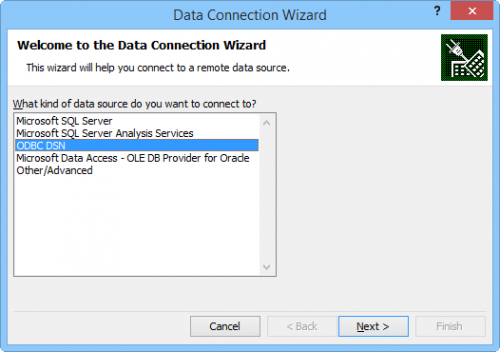
Wizard pane 1
- Choose ODBC DSN and click Next.
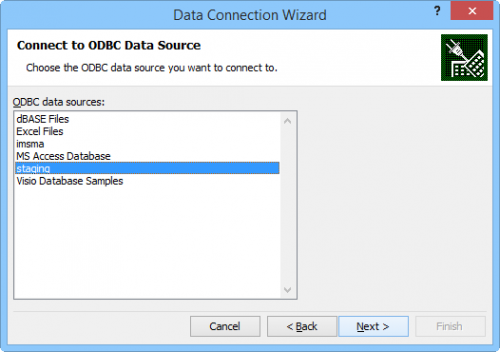
Wizard pane 2
- Select your ODBC source and click Next.
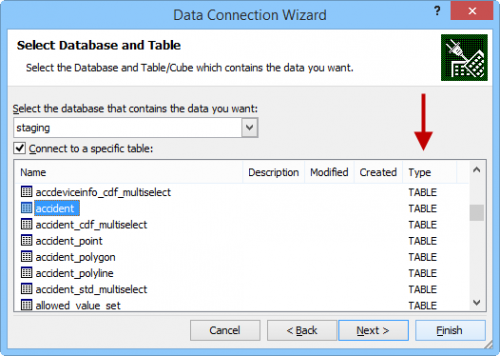
Wizard pane 3
- First are the views listed and the tables. Scroll until you find the table/view you would like to load into Excel. Select it and click Next.


| ||||||||||||||
