Start the IMSMA Server
 |
If you are running the IMSMA server and client on the same computer, complete the procedures to start the IMSMA server.
If you are running the IMSMA server and client on different computers, complete the procedures to start the IMSMA server only on the computer designated as the IMSMA server. It is possible to start-up the IMSMA server with a bat-file. |
To start the IMSMA server:
- Right-click the IMSMA Control Centre icon
 that is displayed in the TrayLauncher.
 - Select the IMSMA Server option and then select the Start Server option.
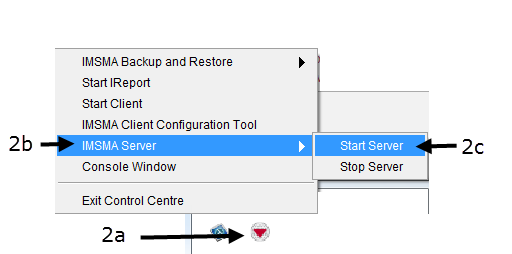


The Server Progress Window displays.
|
If a Windows Security Alert window appears, click the Unblock button. |
|
If a Windows User Account Control window appears, click the Yes button. |
When the Server Progress reaches 100% you can start the IMSMA Client. If you have problems starting the IMSMANG server, please refer to Ports.
|
If you would like to view output messages from the server, select the Console Window and click on Server tab. See View the Server and/or Client Output Messages page. |
{{#switch:|subgroup|child=|none=|#default=
{{#if:|<th scope="col" style="border-left:2px solid #fdfdfd;width:100%;|}}{{#if:|{{#if:Using IMSMANG|}}}}{{#if:Display the IMSMA Control Centre Icon · IMSMA Client Configuration Tool · Start the IMSMA Server · Start IMSMA client · Exit IMSMA client · Stop the IMSMA Server · View the Server and/or Client Output Messages · Exit Control Centre|{{#if:Using IMSMANG|}}{{#if:|}}{{#if: Starting and Stopping IMSMANG|<td style="text-align:left;border-left-width:2px;border-left-style:solid;|{{#if:|}}}}{{#if:|{{#if:Using IMSMANGDisplay the IMSMA Control Centre Icon · IMSMA Client Configuration Tool · Start the IMSMA Server · Start IMSMA client · Exit IMSMA client · Stop the IMSMA Server · View the Server and/or Client Output Messages · Exit Control Centre|}}{{#if:|<td style="text-align:left;border-left-width:2px;border-left-style:solid;|}}{{#if:|{{#if:Using IMSMANGDisplay the IMSMA Control Centre Icon · IMSMA Client Configuration Tool · Start the IMSMA Server · Start IMSMA client · Exit IMSMA client · Stop the IMSMA Server · View the Server and/or Client Output Messages · Exit Control Centre|}}{{#if:|<td style="text-align:left;border-left-width:2px;border-left-style:solid;|}}{{#if:|{{#if:|<td style="text-align:left;border-left-width:2px;border-left-style:solid;|}}{{#if:|{{#if:|<td style="text-align:left;border-left-width:2px;border-left-style:solid;|}}{{#if:|{{#if:|<td style="text-align:left;border-left-width:2px;border-left-style:solid;|}}{{#if:|{{#if:|<td style="text-align:left;border-left-width:2px;border-left-style:solid;|}}{{#if:|{{#if:|<td style="text-align:left;border-left-width:2px;border-left-style:solid;|}}{{#if:|{{#if:|<td style="text-align:left;border-left-width:2px;border-left-style:solid;|}}{{#if:|{{#if:|<td style="text-align:left;border-left-width:2px;border-left-style:solid;|}}{{#if:|{{#if:|<td style="text-align:left;border-left-width:2px;border-left-style:solid;|}}{{#if:|{{#if:|<td style="text-align:left;border-left-width:2px;border-left-style:solid;|}}{{#if:|{{#if:|<td style="text-align:left;border-left-width:2px;border-left-style:solid;|}}{{#if:|{{#if:|<td style="text-align:left;border-left-width:2px;border-left-style:solid;|}}{{#if:|{{#if:|<td style="text-align:left;border-left-width:2px;border-left-style:solid;|}}{{#if:|{{#if:|<td style="text-align:left;border-left-width:2px;border-left-style:solid;|}}{{#if:|{{#if:|<td style="text-align:left;border-left-width:2px;border-left-style:solid;|}}{{#if:|{{#if:|<td style="text-align:left;border-left-width:2px;border-left-style:solid;|}}{{#if:|{{#if:|<td style="text-align:left;border-left-width:2px;border-left-style:solid;|}}{{#if:|{{#if:|<td style="text-align:left;border-left-width:2px;border-left-style:solid;|}}{{#if:|{{#if:Using IMSMANGDisplay the IMSMA Control Centre Icon · IMSMA Client Configuration Tool · Start the IMSMA Server · Start IMSMA client · Exit IMSMA client · Stop the IMSMA Server · View the Server and/or Client Output Messages · Exit Control Centre|}}}}| }}<table cellspacing="0" class="nowraplinks hlist {{#if:Using IMSMANG|{{#switch:autocollapse|plain|off=|#default=collapsible {{#if:autocollapse|autocollapse|autocollapse}}}}}} {{#switch:|subgroup|child|none=navbox-subgroup" style="border-spacing:0;;|#default=navbox-inner" style="border-spacing:0;background:transparent;color:inherit}};;">{{#if:Using IMSMANG| | ||||
{{{above}}} | ||||
{{{imageleft}}} | Starting and Stopping IMSMANG |
{{{image}}} | ||
| {{{group2}}} |
{{{list2}}} | |||
| {{{group3}}} |
{{{list3}}} | |||
| {{{group4}}} |
{{{list4}}} | |||
| {{{group5}}} |
{{{list5}}} | |||
| {{{group6}}} |
{{{list6}}} | |||
| {{{group7}}} |
{{{list7}}} | |||
| {{{group8}}} |
{{{list8}}} | |||
| {{{group9}}} |
{{{list9}}} | |||
| {{{group10}}} |
{{{list10}}} | |||
| {{{group11}}} |
{{{list11}}} | |||
| {{{group12}}} |
{{{list12}}} | |||
| {{{group13}}} |
{{{list13}}} | |||
| {{{group14}}} |
{{{list14}}} | |||
| {{{group15}}} |
{{{list15}}} | |||
| {{{group16}}} |
{{{list16}}} | |||
| {{{group17}}} |
{{{list17}}} | |||
| {{{group18}}} |
{{{list18}}} | |||
| {{{group19}}} |
{{{list19}}} | |||
| {{{group20}}} |
{{{list20}}} | |||
{{{below}}} | ||||
{{#switch:|subgroup|child=
|none=|#default=}}{{#ifeq:|Template|{{#ifeq:|child||{{#ifeq:|subgroup||{{#switch:start the imsma server
|doc
|sandbox
|testcases =
|#default = {{#switch:hlist
 |plainlist
 |hlist
 |hlist hnum
 |hlist vcard
 |vcard hlist =
 |#default =
 }}
}}
}}}}}}