Change Element Display Properties: Difference between revisions
No edit summary |
No edit summary |
||
| Line 5: | Line 5: | ||
Fields are added to the form template design pane with default properties such as width and height. You can modify these properties to customise the look of your data entry form template. | Fields are added to the form template design pane with default properties such as width and height. You can modify these properties to customise the look of your data entry form template. | ||
<ol> | <ol> | ||
<li> | <li>To open the Component Property Editor either | ||
*Double-click the field that you would like to change. | *Double-click the field that you would like to change. | ||
*Select the field and click the '''Properties''' button. </li> | *Select the field and click the '''Properties''' button. </li> | ||
The fields in the Component Property Editor window differ depending on the widget type selected. | |||
{| class="wikitable" | {| class="wikitable" | ||
Revision as of 17:04, 19 June 2017
| How To |
|---|
|
{{#if: Set Default Values | |}}{{#if: Set Required Fields | |}}{{#if:|
|
Fields are added to the form template design pane with default properties such as width and height. You can modify these properties to customise the look of your data entry form template.
- To open the Component Property Editor either
- Double-click the field that you would like to change.
- Select the field and click the Properties button.
Element Property Editor Read More Label / Text Tool 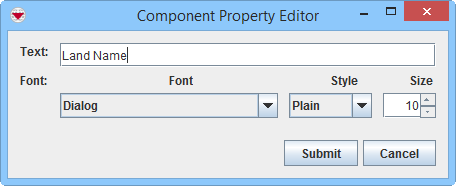
Country Structure 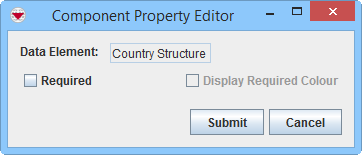
Date 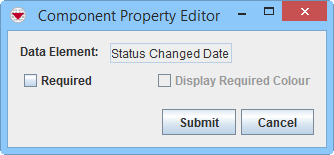
Icon Tool 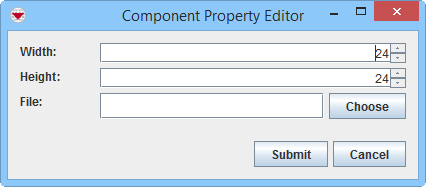
Add an Image to the Data Entry Form Template ID widget 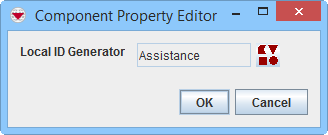
Apply a Local ID Generator Line Tool 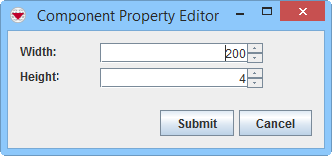
Add a Line to the Data Entry Form Template Multiple Select 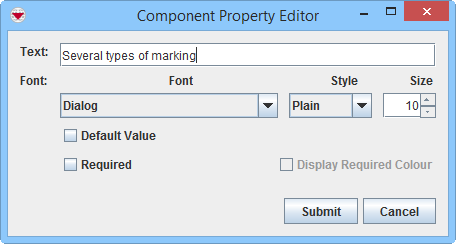
Add values to enumeration list Number / Text Field 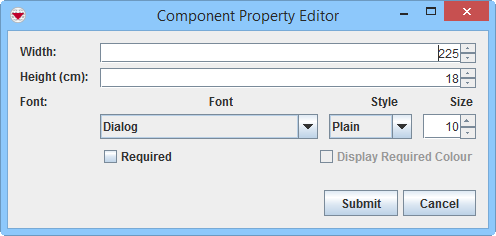
Organisation 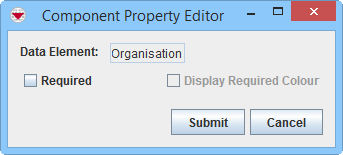
Place 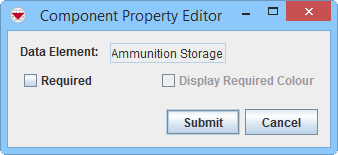
Single Select 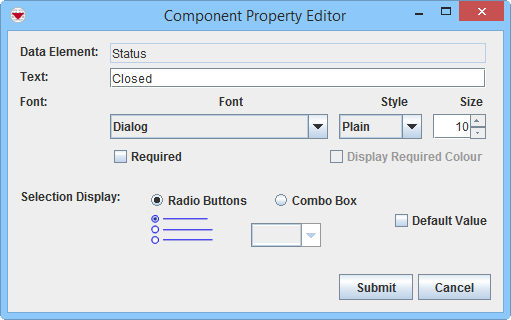
Add values to enumeration list
Change Single Selection Option List
Change Display Option for Single SelectText Area 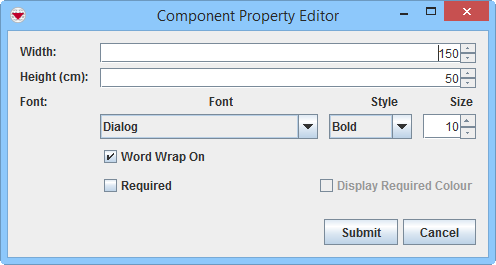

In version 6.0 the display choice between Text Field and Text Area for Text field CDFs has been introduced. Table 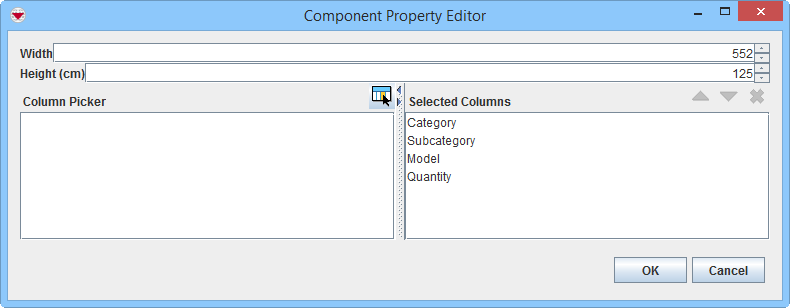
Change table properties


{{#switch:|subgroup|child=|none=|#default=
{{#if:|<th scope="col" style="border-left:2px solid #fdfdfd;width:100%;|}}{{#if:|{{#if:Customising IMSMANG|}}}}{{#if:{{#switch:{{#if:|{{{border}}}|child}}|subgroup|child=|none=|#default=| }}<table cellspacing="0" class="nowraplinks hlist {{#if:Customising IMSMANG|{{#switch:autocollapse|plain|off=|#default=collapsible {{#if:autocollapse|autocollapse|autocollapse}}}}}} {{#switch:|subgroup|child|none=navbox-subgroup" style="border-spacing:0;;|#default=navbox-inner" style="border-spacing:0;background:transparent;color:inherit}};;">{{#if:Customising IMSMANG| | |
{{{above}}} |
| }}{{#if:|{{#if:|<th scope="col" style="border-left:2px solid #fdfdfd;width:100%;|}}{{#if:|{{#if:|}}}}{{#if:Data Entry Form Templates · Data Entry Form Template Designer Window · Change an Existing Data Entry Form Template|{{#if:|}}{{#if:|}}{{#if:{{#if:General| General }}|<td style="text-align:left;border-left-width:2px;border-left-style:solid;|{{#if:|}}}}{{#if:Change the Page Orientation, Margins, or Paper Size · Data Entry Form Fields · Add Item Attributes to the Design Pane · Add Subobject Custom Defined Fields to the Design Pane|{{#if:Data Entry Form Templates · Data Entry Form Template Designer Window · Change an Existing Data Entry Form Template|}}{{#if:{{#if:Get started|Get started }}|<td style="text-align:left;border-left-width:2px;border-left-style:solid;|}}{{#if:Add Text to the Data Entry Form Template · Add an Image to the Data Entry Form Template · Add a Scribe Panel to the Data Entry Form Template · Add a Line to the Data Entry Form Template|{{#if:Data Entry Form Templates · Data Entry Form Template Designer Window · Change an Existing Data Entry Form TemplateChange the Page Orientation, Margins, or Paper Size · Data Entry Form Fields · Add Item Attributes to the Design Pane · Add Subobject Custom Defined Fields to the Design Pane|}}{{#if:{{#if:Tools|Tools }}|<td style="text-align:left;border-left-width:2px;border-left-style:solid;|}}{{#if:Select Elements within the Design Pane · Select Elements from the Logical Tree · Move Form Elements within the Design Pane · Verify Which Database Field Is Used in the Data Entry Form Template · Delete Selected Elements from the Data Entry Form|{{#if:{{#if:Elements|Elements }}|<td style="text-align:left;border-left-width:2px;border-left-style:solid;|}}{{#if:Align Form Elements · Apply a Local ID Generator · Change Element Display Properties · Customise Tables · Set Required Fields · Set Default Value · Change Single Selection Option List|{{#if:{{#if:Properties|Properties }}|<td style="text-align:left;border-left-width:2px;border-left-style:solid;|}}{{#if:Save a Data Entry Form Template · Preview a Data Entry Form Template · Publish a Data Entry Form Template · Reconcile CDFs When Publishing a Data Entry Form · Republish Existing Data Entry Form Templates · Share Data Entry Form Templates|{{#if:{{#if:Publish|Publish }}|<td style="text-align:left;border-left-width:2px;border-left-style:solid;|}}{{#if:Access and Use the Published Template List · View the Data Entry Form Template · Change the Status of a Published Data Entry Form Template · Delete a Data Entry Form Template|{{#if:{{#if:Published|Published }}|<td style="text-align:left;border-left-width:2px;border-left-style:solid;|}}{{#if:|{{#if:{{#if:|{{{group8}}} }}|<td style="text-align:left;border-left-width:2px;border-left-style:solid;|}}{{#if:|{{#if:{{#if:|{{{group9}}} }}|<td style="text-align:left;border-left-width:2px;border-left-style:solid;|}}{{#if:|{{#if:{{#if:|{{{group10}}} }}|<td style="text-align:left;border-left-width:2px;border-left-style:solid;|}}{{#if:|{{#if:{{#if:|{{{group11}}} }}|<td style="text-align:left;border-left-width:2px;border-left-style:solid;|}}{{#if:|{{#if:{{#if:|{{{group12}}} }}|<td style="text-align:left;border-left-width:2px;border-left-style:solid;|}}{{#if:|{{#if:{{#if:|{{{group13}}} }}|<td style="text-align:left;border-left-width:2px;border-left-style:solid;|}}{{#if:|{{#if:{{#if:|{{{group14}}} }}|<td style="text-align:left;border-left-width:2px;border-left-style:solid;|}}{{#if:|{{#if:{{#if:|{{{group15}}} }}|<td style="text-align:left;border-left-width:2px;border-left-style:solid;|}}{{#if:|{{#if:{{#if:|{{{group16}}} }}|<td style="text-align:left;border-left-width:2px;border-left-style:solid;|}}{{#if:|{{#if:{{#if:|{{{group17}}} }}|<td style="text-align:left;border-left-width:2px;border-left-style:solid;|}}{{#if:|{{#if:{{#if:|{{{group18}}} }}|<td style="text-align:left;border-left-width:2px;border-left-style:solid;|}}{{#if:|{{#if:{{#if:|{{{group19}}} }}|<td style="text-align:left;border-left-width:2px;border-left-style:solid;|}}{{#if:|{{#if:{{#if:|{{{group20}}} }}|<td style="text-align:left;border-left-width:2px;border-left-style:solid;|}}{{#if:|{{#if:Data Entry Form Templates · Data Entry Form Template Designer Window · Change an Existing Data Entry Form TemplateChange the Page Orientation, Margins, or Paper Size · Data Entry Form Fields · Add Item Attributes to the Design Pane · Add Subobject Custom Defined Fields to the Design PaneAdd Text to the Data Entry Form Template · Add an Image to the Data Entry Form Template · Add a Scribe Panel to the Data Entry Form Template · Add a Line to the Data Entry Form Template|}}}}
|none=|#default= | ||||||||||||||||||||||||||||||||||||||||||||||||||||||||||||||||||||||||||||||||||||||||
}}{{#ifeq:|Template|{{#ifeq:{{#if:|{{{border}}}|child}}|child||{{#ifeq:{{#if:|{{{border}}}|child}}|subgroup||{{#switch:change element display properties
|doc
|sandbox
|testcases =
|#default = {{#switch:
 |plainlist
 |hlist
 |hlist hnum
 |hlist vcard
 |vcard hlist =
 |#default =
 }}
}}
}}}}}}|{{#if:Customising IMSMANG|}}{{#if:|
}}{{#if: Design Data Entry Forms| Design Data Entry Forms<td style="text-align:left;border-left-width:2px;border-left-style:solid;|
|none=|#default=
| }}{{#if:|{{#if:|<th scope="col" style="border-left:2px solid #fdfdfd;width:100%;|}}{{#if:|{{#if:|}}}}{{#if:Data Entry Form Templates · Data Entry Form Template Designer Window · Change an Existing Data Entry Form Template|{{#if:|}}{{#if:|}}{{#if:{{#if:General| General }}|<td style="text-align:left;border-left-width:2px;border-left-style:solid;|{{#if:|}}}}{{#if:Change the Page Orientation, Margins, or Paper Size · Data Entry Form Fields · Add Item Attributes to the Design Pane · Add Subobject Custom Defined Fields to the Design Pane|{{#if:Data Entry Form Templates · Data Entry Form Template Designer Window · Change an Existing Data Entry Form Template|}}{{#if:{{#if:Get started|Get started }}|<td style="text-align:left;border-left-width:2px;border-left-style:solid;|}}{{#if:Add Text to the Data Entry Form Template · Add an Image to the Data Entry Form Template · Add a Scribe Panel to the Data Entry Form Template · Add a Line to the Data Entry Form Template|{{#if:Data Entry Form Templates · Data Entry Form Template Designer Window · Change an Existing Data Entry Form TemplateChange the Page Orientation, Margins, or Paper Size · Data Entry Form Fields · Add Item Attributes to the Design Pane · Add Subobject Custom Defined Fields to the Design Pane|}}{{#if:{{#if:Tools|Tools }}|<td style="text-align:left;border-left-width:2px;border-left-style:solid;|}}{{#if:Select Elements within the Design Pane · Select Elements from the Logical Tree · Move Form Elements within the Design Pane · Verify Which Database Field Is Used in the Data Entry Form Template · Delete Selected Elements from the Data Entry Form|{{#if:{{#if:Elements|Elements }}|<td style="text-align:left;border-left-width:2px;border-left-style:solid;|}}{{#if:Align Form Elements · Apply a Local ID Generator · Change Element Display Properties · Customise Tables · Set Required Fields · Set Default Value · Change Single Selection Option List|{{#if:{{#if:Properties|Properties }}|<td style="text-align:left;border-left-width:2px;border-left-style:solid;|}}{{#if:Save a Data Entry Form Template · Preview a Data Entry Form Template · Publish a Data Entry Form Template · Reconcile CDFs When Publishing a Data Entry Form · Republish Existing Data Entry Form Templates · Share Data Entry Form Templates|{{#if:{{#if:Publish|Publish }}|<td style="text-align:left;border-left-width:2px;border-left-style:solid;|}}{{#if:Access and Use the Published Template List · View the Data Entry Form Template · Change the Status of a Published Data Entry Form Template · Delete a Data Entry Form Template|{{#if:{{#if:Published|Published }}|<td style="text-align:left;border-left-width:2px;border-left-style:solid;|}}{{#if:|{{#if:{{#if:|{{{group8}}} }}|<td style="text-align:left;border-left-width:2px;border-left-style:solid;|}}{{#if:|{{#if:{{#if:|{{{group9}}} }}|<td style="text-align:left;border-left-width:2px;border-left-style:solid;|}}{{#if:|{{#if:{{#if:|{{{group10}}} }}|<td style="text-align:left;border-left-width:2px;border-left-style:solid;|}}{{#if:|{{#if:{{#if:|{{{group11}}} }}|<td style="text-align:left;border-left-width:2px;border-left-style:solid;|}}{{#if:|{{#if:{{#if:|{{{group12}}} }}|<td style="text-align:left;border-left-width:2px;border-left-style:solid;|}}{{#if:|{{#if:{{#if:|{{{group13}}} }}|<td style="text-align:left;border-left-width:2px;border-left-style:solid;|}}{{#if:|{{#if:{{#if:|{{{group14}}} }}|<td style="text-align:left;border-left-width:2px;border-left-style:solid;|}}{{#if:|{{#if:{{#if:|{{{group15}}} }}|<td style="text-align:left;border-left-width:2px;border-left-style:solid;|}}{{#if:|{{#if:{{#if:|{{{group16}}} }}|<td style="text-align:left;border-left-width:2px;border-left-style:solid;|}}{{#if:|{{#if:{{#if:|{{{group17}}} }}|<td style="text-align:left;border-left-width:2px;border-left-style:solid;|}}{{#if:|{{#if:{{#if:|{{{group18}}} }}|<td style="text-align:left;border-left-width:2px;border-left-style:solid;|}}{{#if:|{{#if:{{#if:|{{{group19}}} }}|<td style="text-align:left;border-left-width:2px;border-left-style:solid;|}}{{#if:|{{#if:{{#if:|{{{group20}}} }}|<td style="text-align:left;border-left-width:2px;border-left-style:solid;|}}{{#if:|{{#if:Data Entry Form Templates · Data Entry Form Template Designer Window · Change an Existing Data Entry Form TemplateChange the Page Orientation, Margins, or Paper Size · Data Entry Form Fields · Add Item Attributes to the Design Pane · Add Subobject Custom Defined Fields to the Design PaneAdd Text to the Data Entry Form Template · Add an Image to the Data Entry Form Template · Add a Scribe Panel to the Data Entry Form Template · Add a Line to the Data Entry Form Template|}}}}
|none=|#default= | ||||||||||||||||||||||||||||||||||||||||||||||||||||||||||||||||||||||||||||||||||||||||
}}{{#ifeq:|Template|{{#ifeq:{{#if:|{{{border}}}|child}}|child||{{#ifeq:{{#if:|{{{border}}}|child}}|subgroup||{{#switch:change element display properties
|doc
|sandbox
|testcases =
|#default = {{#switch:
 |plainlist
 |hlist
 |hlist hnum
 |hlist vcard
 |vcard hlist =
 |#default =
 }}
}}
}}}}}}{{#if:|
}}}}{{#if:|{{#if:Customising IMSMANG{{#switch:{{#if:|{{{border}}}|child}}|subgroup|child=|none=|#default=
| }}{{#if:|{{#if:|<th scope="col" style="border-left:2px solid #fdfdfd;width:100%;|}}{{#if:|{{#if:|}}}}{{#if:Data Entry Form Templates · Data Entry Form Template Designer Window · Change an Existing Data Entry Form Template|{{#if:|}}{{#if:|}}{{#if:{{#if:General| General }}|<td style="text-align:left;border-left-width:2px;border-left-style:solid;|{{#if:|}}}}{{#if:Change the Page Orientation, Margins, or Paper Size · Data Entry Form Fields · Add Item Attributes to the Design Pane · Add Subobject Custom Defined Fields to the Design Pane|{{#if:Data Entry Form Templates · Data Entry Form Template Designer Window · Change an Existing Data Entry Form Template|}}{{#if:{{#if:Get started|Get started }}|<td style="text-align:left;border-left-width:2px;border-left-style:solid;|}}{{#if:Add Text to the Data Entry Form Template · Add an Image to the Data Entry Form Template · Add a Scribe Panel to the Data Entry Form Template · Add a Line to the Data Entry Form Template|{{#if:Data Entry Form Templates · Data Entry Form Template Designer Window · Change an Existing Data Entry Form TemplateChange the Page Orientation, Margins, or Paper Size · Data Entry Form Fields · Add Item Attributes to the Design Pane · Add Subobject Custom Defined Fields to the Design Pane|}}{{#if:{{#if:Tools|Tools }}|<td style="text-align:left;border-left-width:2px;border-left-style:solid;|}}{{#if:Select Elements within the Design Pane · Select Elements from the Logical Tree · Move Form Elements within the Design Pane · Verify Which Database Field Is Used in the Data Entry Form Template · Delete Selected Elements from the Data Entry Form|{{#if:{{#if:Elements|Elements }}|<td style="text-align:left;border-left-width:2px;border-left-style:solid;|}}{{#if:Align Form Elements · Apply a Local ID Generator · Change Element Display Properties · Customise Tables · Set Required Fields · Set Default Value · Change Single Selection Option List|{{#if:{{#if:Properties|Properties }}|<td style="text-align:left;border-left-width:2px;border-left-style:solid;|}}{{#if:Save a Data Entry Form Template · Preview a Data Entry Form Template · Publish a Data Entry Form Template · Reconcile CDFs When Publishing a Data Entry Form · Republish Existing Data Entry Form Templates · Share Data Entry Form Templates|{{#if:{{#if:Publish|Publish }}|<td style="text-align:left;border-left-width:2px;border-left-style:solid;|}}{{#if:Access and Use the Published Template List · View the Data Entry Form Template · Change the Status of a Published Data Entry Form Template · Delete a Data Entry Form Template|{{#if:{{#if:Published|Published }}|<td style="text-align:left;border-left-width:2px;border-left-style:solid;|}}{{#if:|{{#if:{{#if:|{{{group8}}} }}|<td style="text-align:left;border-left-width:2px;border-left-style:solid;|}}{{#if:|{{#if:{{#if:|{{{group9}}} }}|<td style="text-align:left;border-left-width:2px;border-left-style:solid;|}}{{#if:|{{#if:{{#if:|{{{group10}}} }}|<td style="text-align:left;border-left-width:2px;border-left-style:solid;|}}{{#if:|{{#if:{{#if:|{{{group11}}} }}|<td style="text-align:left;border-left-width:2px;border-left-style:solid;|}}{{#if:|{{#if:{{#if:|{{{group12}}} }}|<td style="text-align:left;border-left-width:2px;border-left-style:solid;|}}{{#if:|{{#if:{{#if:|{{{group13}}} }}|<td style="text-align:left;border-left-width:2px;border-left-style:solid;|}}{{#if:|{{#if:{{#if:|{{{group14}}} }}|<td style="text-align:left;border-left-width:2px;border-left-style:solid;|}}{{#if:|{{#if:{{#if:|{{{group15}}} }}|<td style="text-align:left;border-left-width:2px;border-left-style:solid;|}}{{#if:|{{#if:{{#if:|{{{group16}}} }}|<td style="text-align:left;border-left-width:2px;border-left-style:solid;|}}{{#if:|{{#if:{{#if:|{{{group17}}} }}|<td style="text-align:left;border-left-width:2px;border-left-style:solid;|}}{{#if:|{{#if:{{#if:|{{{group18}}} }}|<td style="text-align:left;border-left-width:2px;border-left-style:solid;|}}{{#if:|{{#if:{{#if:|{{{group19}}} }}|<td style="text-align:left;border-left-width:2px;border-left-style:solid;|}}{{#if:|{{#if:{{#if:|{{{group20}}} }}|<td style="text-align:left;border-left-width:2px;border-left-style:solid;|}}{{#if:|{{#if:Data Entry Form Templates · Data Entry Form Template Designer Window · Change an Existing Data Entry Form TemplateChange the Page Orientation, Margins, or Paper Size · Data Entry Form Fields · Add Item Attributes to the Design Pane · Add Subobject Custom Defined Fields to the Design PaneAdd Text to the Data Entry Form Template · Add an Image to the Data Entry Form Template · Add a Scribe Panel to the Data Entry Form Template · Add a Line to the Data Entry Form Template|}}}}
|none=|#default= | ||||||||||||||||||||||||||||||||||||||||||||||||||||||||||||||||||||||||||||||||||||||||
}}{{#ifeq:|Template|{{#ifeq:{{#if:|{{{border}}}|child}}|child||{{#ifeq:{{#if:|{{{border}}}|child}}|subgroup||{{#switch:change element display properties
|doc
|sandbox
|testcases =
|#default = {{#switch:
 |plainlist
 |hlist
 |hlist hnum
 |hlist vcard
 |vcard hlist =
 |#default =
 }}
}}
}}}}}}|}}{{#if:|{{{group2}}}<td style="text-align:left;border-left-width:2px;border-left-style:solid;|
}}{{#if:|{{#if:Customising IMSMANG{{#switch:{{#if:|{{{border}}}|child}}|subgroup|child=|none=|#default=
| }}{{#if:|{{#if:|<th scope="col" style="border-left:2px solid #fdfdfd;width:100%;|}}{{#if:|{{#if:|}}}}{{#if:Data Entry Form Templates · Data Entry Form Template Designer Window · Change an Existing Data Entry Form Template|{{#if:|}}{{#if:|}}{{#if:{{#if:General| General }}|<td style="text-align:left;border-left-width:2px;border-left-style:solid;|{{#if:|}}}}{{#if:Change the Page Orientation, Margins, or Paper Size · Data Entry Form Fields · Add Item Attributes to the Design Pane · Add Subobject Custom Defined Fields to the Design Pane|{{#if:Data Entry Form Templates · Data Entry Form Template Designer Window · Change an Existing Data Entry Form Template|}}{{#if:{{#if:Get started|Get started }}|<td style="text-align:left;border-left-width:2px;border-left-style:solid;|}}{{#if:Add Text to the Data Entry Form Template · Add an Image to the Data Entry Form Template · Add a Scribe Panel to the Data Entry Form Template · Add a Line to the Data Entry Form Template|{{#if:Data Entry Form Templates · Data Entry Form Template Designer Window · Change an Existing Data Entry Form TemplateChange the Page Orientation, Margins, or Paper Size · Data Entry Form Fields · Add Item Attributes to the Design Pane · Add Subobject Custom Defined Fields to the Design Pane|}}{{#if:{{#if:Tools|Tools }}|<td style="text-align:left;border-left-width:2px;border-left-style:solid;|}}{{#if:Select Elements within the Design Pane · Select Elements from the Logical Tree · Move Form Elements within the Design Pane · Verify Which Database Field Is Used in the Data Entry Form Template · Delete Selected Elements from the Data Entry Form|{{#if:{{#if:Elements|Elements }}|<td style="text-align:left;border-left-width:2px;border-left-style:solid;|}}{{#if:Align Form Elements · Apply a Local ID Generator · Change Element Display Properties · Customise Tables · Set Required Fields · Set Default Value · Change Single Selection Option List|{{#if:{{#if:Properties|Properties }}|<td style="text-align:left;border-left-width:2px;border-left-style:solid;|}}{{#if:Save a Data Entry Form Template · Preview a Data Entry Form Template · Publish a Data Entry Form Template · Reconcile CDFs When Publishing a Data Entry Form · Republish Existing Data Entry Form Templates · Share Data Entry Form Templates|{{#if:{{#if:Publish|Publish }}|<td style="text-align:left;border-left-width:2px;border-left-style:solid;|}}{{#if:Access and Use the Published Template List · View the Data Entry Form Template · Change the Status of a Published Data Entry Form Template · Delete a Data Entry Form Template|{{#if:{{#if:Published|Published }}|<td style="text-align:left;border-left-width:2px;border-left-style:solid;|}}{{#if:|{{#if:{{#if:|{{{group8}}} }}|<td style="text-align:left;border-left-width:2px;border-left-style:solid;|}}{{#if:|{{#if:{{#if:|{{{group9}}} }}|<td style="text-align:left;border-left-width:2px;border-left-style:solid;|}}{{#if:|{{#if:{{#if:|{{{group10}}} }}|<td style="text-align:left;border-left-width:2px;border-left-style:solid;|}}{{#if:|{{#if:{{#if:|{{{group11}}} }}|<td style="text-align:left;border-left-width:2px;border-left-style:solid;|}}{{#if:|{{#if:{{#if:|{{{group12}}} }}|<td style="text-align:left;border-left-width:2px;border-left-style:solid;|}}{{#if:|{{#if:{{#if:|{{{group13}}} }}|<td style="text-align:left;border-left-width:2px;border-left-style:solid;|}}{{#if:|{{#if:{{#if:|{{{group14}}} }}|<td style="text-align:left;border-left-width:2px;border-left-style:solid;|}}{{#if:|{{#if:{{#if:|{{{group15}}} }}|<td style="text-align:left;border-left-width:2px;border-left-style:solid;|}}{{#if:|{{#if:{{#if:|{{{group16}}} }}|<td style="text-align:left;border-left-width:2px;border-left-style:solid;|}}{{#if:|{{#if:{{#if:|{{{group17}}} }}|<td style="text-align:left;border-left-width:2px;border-left-style:solid;|}}{{#if:|{{#if:{{#if:|{{{group18}}} }}|<td style="text-align:left;border-left-width:2px;border-left-style:solid;|}}{{#if:|{{#if:{{#if:|{{{group19}}} }}|<td style="text-align:left;border-left-width:2px;border-left-style:solid;|}}{{#if:|{{#if:{{#if:|{{{group20}}} }}|<td style="text-align:left;border-left-width:2px;border-left-style:solid;|}}{{#if:|{{#if:Data Entry Form Templates · Data Entry Form Template Designer Window · Change an Existing Data Entry Form TemplateChange the Page Orientation, Margins, or Paper Size · Data Entry Form Fields · Add Item Attributes to the Design Pane · Add Subobject Custom Defined Fields to the Design PaneAdd Text to the Data Entry Form Template · Add an Image to the Data Entry Form Template · Add a Scribe Panel to the Data Entry Form Template · Add a Line to the Data Entry Form Template|}}}}
|none=|#default= | ||||||||||||||||||||||||||||||||||||||||||||||||||||||||||||||||||||||||||||||||||||||||
}}{{#ifeq:|Template|{{#ifeq:{{#if:|{{{border}}}|child}}|child||{{#ifeq:{{#if:|{{{border}}}|child}}|subgroup||{{#switch:change element display properties
|doc
|sandbox
|testcases =
|#default = {{#switch:
 |plainlist
 |hlist
 |hlist hnum
 |hlist vcard
 |vcard hlist =
 |#default =
 }}
}}
}}}}}}|}}{{#if:|{{{group3}}}<td style="text-align:left;border-left-width:2px;border-left-style:solid;|
}}{{#if:|{{#if:|{{{group4}}}<td style="text-align:left;border-left-width:2px;border-left-style:solid;|
}}{{#if:|{{#if:|{{{group5}}}<td style="text-align:left;border-left-width:2px;border-left-style:solid;|
}}{{#if:|{{#if:|{{{group6}}}<td style="text-align:left;border-left-width:2px;border-left-style:solid;|
}}{{#if:|{{#if:|{{{group7}}}<td style="text-align:left;border-left-width:2px;border-left-style:solid;|
}}{{#if:|{{#if:|{{{group8}}}<td style="text-align:left;border-left-width:2px;border-left-style:solid;|
}}{{#if:|{{#if:|{{{group9}}}<td style="text-align:left;border-left-width:2px;border-left-style:solid;|
}}{{#if:|{{#if:|{{{group10}}}<td style="text-align:left;border-left-width:2px;border-left-style:solid;|
}}{{#if:|{{#if:|{{{group11}}}<td style="text-align:left;border-left-width:2px;border-left-style:solid;|
}}{{#if:|{{#if:|{{{group12}}}<td style="text-align:left;border-left-width:2px;border-left-style:solid;|
}}{{#if:|{{#if:|{{{group13}}}<td style="text-align:left;border-left-width:2px;border-left-style:solid;|
}}{{#if:|{{#if:|{{{group14}}}<td style="text-align:left;border-left-width:2px;border-left-style:solid;|
}}{{#if:|{{#if:|{{{group15}}}<td style="text-align:left;border-left-width:2px;border-left-style:solid;|
}}{{#if:|{{#if:|{{{group16}}}<td style="text-align:left;border-left-width:2px;border-left-style:solid;|
}}{{#if:|{{#if:|{{{group17}}}<td style="text-align:left;border-left-width:2px;border-left-style:solid;|
}}{{#if:|{{#if:|{{{group18}}}<td style="text-align:left;border-left-width:2px;border-left-style:solid;|
}}{{#if:|{{#if:|{{{group19}}}<td style="text-align:left;border-left-width:2px;border-left-style:solid;|
}}{{#if:|{{#if:|{{{group20}}}<td style="text-align:left;border-left-width:2px;border-left-style:solid;|
}}{{#if:|{{#if:Customising IMSMANG{{#switch:{{#if:|{{{border}}}|child}}|subgroup|child=|none=|#default=
| }}{{#if:|{{#if:|<th scope="col" style="border-left:2px solid #fdfdfd;width:100%;|}}{{#if:|{{#if:|}}}}{{#if:Data Entry Form Templates · Data Entry Form Template Designer Window · Change an Existing Data Entry Form Template|{{#if:|}}{{#if:|}}{{#if:{{#if:General| General }}|<td style="text-align:left;border-left-width:2px;border-left-style:solid;|{{#if:|}}}}{{#if:Change the Page Orientation, Margins, or Paper Size · Data Entry Form Fields · Add Item Attributes to the Design Pane · Add Subobject Custom Defined Fields to the Design Pane|{{#if:Data Entry Form Templates · Data Entry Form Template Designer Window · Change an Existing Data Entry Form Template|}}{{#if:{{#if:Get started|Get started }}|<td style="text-align:left;border-left-width:2px;border-left-style:solid;|}}{{#if:Add Text to the Data Entry Form Template · Add an Image to the Data Entry Form Template · Add a Scribe Panel to the Data Entry Form Template · Add a Line to the Data Entry Form Template|{{#if:Data Entry Form Templates · Data Entry Form Template Designer Window · Change an Existing Data Entry Form TemplateChange the Page Orientation, Margins, or Paper Size · Data Entry Form Fields · Add Item Attributes to the Design Pane · Add Subobject Custom Defined Fields to the Design Pane|}}{{#if:{{#if:Tools|Tools }}|<td style="text-align:left;border-left-width:2px;border-left-style:solid;|}}{{#if:Select Elements within the Design Pane · Select Elements from the Logical Tree · Move Form Elements within the Design Pane · Verify Which Database Field Is Used in the Data Entry Form Template · Delete Selected Elements from the Data Entry Form|{{#if:{{#if:Elements|Elements }}|<td style="text-align:left;border-left-width:2px;border-left-style:solid;|}}{{#if:Align Form Elements · Apply a Local ID Generator · Change Element Display Properties · Customise Tables · Set Required Fields · Set Default Value · Change Single Selection Option List|{{#if:{{#if:Properties|Properties }}|<td style="text-align:left;border-left-width:2px;border-left-style:solid;|}}{{#if:Save a Data Entry Form Template · Preview a Data Entry Form Template · Publish a Data Entry Form Template · Reconcile CDFs When Publishing a Data Entry Form · Republish Existing Data Entry Form Templates · Share Data Entry Form Templates|{{#if:{{#if:Publish|Publish }}|<td style="text-align:left;border-left-width:2px;border-left-style:solid;|}}{{#if:Access and Use the Published Template List · View the Data Entry Form Template · Change the Status of a Published Data Entry Form Template · Delete a Data Entry Form Template|{{#if:{{#if:Published|Published }}|<td style="text-align:left;border-left-width:2px;border-left-style:solid;|}}{{#if:|{{#if:{{#if:|{{{group8}}} }}|<td style="text-align:left;border-left-width:2px;border-left-style:solid;|}}{{#if:|{{#if:{{#if:|{{{group9}}} }}|<td style="text-align:left;border-left-width:2px;border-left-style:solid;|}}{{#if:|{{#if:{{#if:|{{{group10}}} }}|<td style="text-align:left;border-left-width:2px;border-left-style:solid;|}}{{#if:|{{#if:{{#if:|{{{group11}}} }}|<td style="text-align:left;border-left-width:2px;border-left-style:solid;|}}{{#if:|{{#if:{{#if:|{{{group12}}} }}|<td style="text-align:left;border-left-width:2px;border-left-style:solid;|}}{{#if:|{{#if:{{#if:|{{{group13}}} }}|<td style="text-align:left;border-left-width:2px;border-left-style:solid;|}}{{#if:|{{#if:{{#if:|{{{group14}}} }}|<td style="text-align:left;border-left-width:2px;border-left-style:solid;|}}{{#if:|{{#if:{{#if:|{{{group15}}} }}|<td style="text-align:left;border-left-width:2px;border-left-style:solid;|}}{{#if:|{{#if:{{#if:|{{{group16}}} }}|<td style="text-align:left;border-left-width:2px;border-left-style:solid;|}}{{#if:|{{#if:{{#if:|{{{group17}}} }}|<td style="text-align:left;border-left-width:2px;border-left-style:solid;|}}{{#if:|{{#if:{{#if:|{{{group18}}} }}|<td style="text-align:left;border-left-width:2px;border-left-style:solid;|}}{{#if:|{{#if:{{#if:|{{{group19}}} }}|<td style="text-align:left;border-left-width:2px;border-left-style:solid;|}}{{#if:|{{#if:{{#if:|{{{group20}}} }}|<td style="text-align:left;border-left-width:2px;border-left-style:solid;|}}{{#if:|{{#if:Data Entry Form Templates · Data Entry Form Template Designer Window · Change an Existing Data Entry Form TemplateChange the Page Orientation, Margins, or Paper Size · Data Entry Form Fields · Add Item Attributes to the Design Pane · Add Subobject Custom Defined Fields to the Design PaneAdd Text to the Data Entry Form Template · Add an Image to the Data Entry Form Template · Add a Scribe Panel to the Data Entry Form Template · Add a Line to the Data Entry Form Template|}}}}
|none=|#default= | ||||||||||||||||||||||||||||||||||||||||||||||||||||||||||||||||||||||||||||||||||||||||
}}{{#ifeq:|Template|{{#ifeq:{{#if:|{{{border}}}|child}}|child||{{#ifeq:{{#if:|{{{border}}}|child}}|subgroup||{{#switch:change element display properties
|doc
|sandbox
|testcases =
|#default = {{#switch:
 |plainlist
 |hlist
 |hlist hnum
 |hlist vcard
 |vcard hlist =
 |#default =
 }}
}}
}}}}}}|}}
}}{{#switch:|subgroup|child=
|doc
|sandbox
|testcases =
|#default = {{#switch:hlist
 |plainlist
 |hlist
 |hlist hnum
 |hlist vcard
 |vcard hlist =
 |#default =
 }}
}}
}}}}}}