Upgrade from 5.08.04 to 6.0 process: Difference between revisions
No edit summary |
No edit summary |
||
| Line 86: | Line 86: | ||
# Restore the raw PostGresSQL dump on a computer with IMSMA V6.0; | # Restore the raw PostGresSQL dump on a computer with IMSMA V6.0; | ||
# Scan the restore log for error messages; | # Scan the restore log for error messages; | ||
#: the two error messages below are the so far '''encountered''' error messages but since table structure, relation rules between tables and contents of all {{IMSMANG}} databases are different there might be other error messages that you need to react on; | |||
#:* error message ''COPY fieldreportdesc'' means that it was not possible to load the table so the table is '''empty'''; | |||
#:* error message ''ERROR: insert or update on table "fieldreport" violates foreign key constraint "fieldreport_fieldreportdesc_guid_fkey'' means mandatory reference between tables did not work because of missing values in e.g. imsmaenum table; | |||
# Apply the ''fix imsmaenum Foreign Key constraints'' [[Imsmaenum FK fix | script]] ('''first''' time); | # Apply the ''fix imsmaenum Foreign Key constraints'' [[Imsmaenum FK fix | script]] ('''first''' time); | ||
# Take backup; | # Take backup; | ||
Revision as of 15:18, 24 June 2014
 |
All IMSMA databases are different and all of the steps below are important for getting all countries to a functional V6.0. |
Data Quality SQL queries
There are several SQL queries that should be run before starting the upgrade process, see Data quality checks before upgrading to V6.0.
Run V5.08.04 tools - Locale fix
This tool was created for the upgrade to 5.08.04 and addresses old issues. Many countries did not run it and import scripts may have created new records with issues. This tool has to be run before recalculation the area/length and upgrading to V6.0.
The user-entered format of the coordinates is stored in the database in this format: X | Y | language | country | e.g. 474522|4615907|en|GB| in the column userenteredcoord in the table geopoint.
The locale portion (|en|GB|) of userenteredcoord was added in V5.06.00 but the existing geopoints were not given locale information by the database upgrade functionality. If the locale information was missing, it was added later when field reports were e.g. imported. However, then it was the regional settings of the user doing the import that was used. This created invalid combinations when the data entry was done with other regional settings.
The Locale fix tool will verify that there are no invalid combinations of decimal symbol and locale information in the database. If invalid combinations are stored the tool will try to fix them but there may be combinations that will require SQL updating.
 |
You might need to run the tool with two different regional settings i.e. first with dot as decimal symbol and then with comma as decimal symbol. |
Start the tool by clicking on C:\IMSMAng\ext\LocaleUpdater\run.bat.

Click on the Update Database button

Click on the OK button, note that this is the database user imsma, not the application user imsma

If all existing invalid combinations of decimal symbol used and locale information in the database is corrected, the output in the window will look like the above image. Note that MGRS will be listed in the output.
Run V5.08.04 tools - Recalculation of area/length
The calculations of calculated area (m2) and calculated length (m) have been updated in V5.08.04. Due to that in previous version different formulas were used and anti-clock wise entered polygons resulted in negative square meters the calculated area/length needs to be recalculated before upgrade to V6.0.
|
The tool needs the projection files the coordinate system used by the country for the recalculation of the coordinates |
Start the tool by clicking on C:\IMSMAng\ext\CalcAreaMigration\run.bat.

Click on the OK button

Click on the OK button, note that this is the database user imsma, not the application user imsma

Click on the Start button.
|
If it takes much longer time than usual to process the coordinates e.g. 6200 Accidents takes normally approx. 2 minutes but if it takes 20 minutes, then read the log file because that slow recalculation is an indication that the coordinates vs userenteredcoord are invalid. |
A report will be given at the end. This will show how many objects were updated, processing time, number of failures, and a detailed report of failures with error messages and object id. This report will also be saved automatically to a file under a "reports" subfolder.
The recalculation can be cancelled by the user at any time. The next time it is run, the recalculation will pick up from the last non-completed table. All tables have to be recalculated before continuing with the next step.
Save the published templates as files
The templates might be created with old version of IMSMA and may contain errors that have been undetected in 5.08.04 but will not be working with V6.0. It is recommended to save the very latest version of all templates ever been used for data entry as files (query).
Take full backup
Take a full backup and make sure that the country has a separate file backup of the attachments (especially for countries that has GBs of attachments). It is recommended for your future reference to save all backups produced during the upgrade process.
Extract MySQL
Use the MySQLtoPGSQL tool which will generate two files:
- Dump.sql and
- Views.sql.
The MySQLtoPGSQL tool does not have any installation program. Just copy the folder to somewhere on the C-drive.
- Restore the 5.08.04 database
- If there is already a dump.sql and/or views.sql in the folder, the tool will append to these files. So do not forget to delete these files between working with different countries.
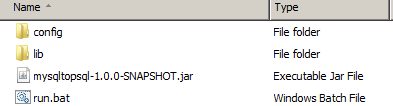
- Click on run.bat to start the tool.
- Rename the MySQL dump.sql that you have in the original backup folder to e.g. MySQLdump.
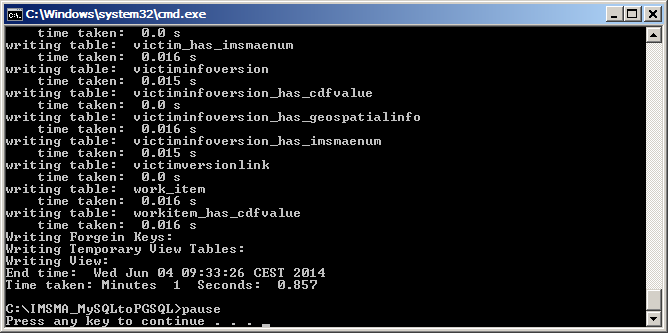
- When the tool has finished, scroll through up in the window and check if there are any error messages.
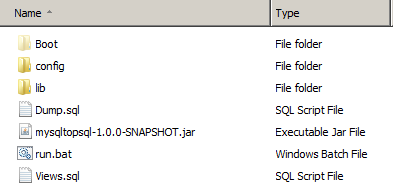
- If not, copy the raw dump.sql and/or views.sql files to the original backup folder.


The dump file created with the tool is a raw dump file in PosGreSQL format which is possible to restore with V6.0. Raw as in it is PostGreSQL format but the table structure, etc. are still 5.08.04 and needs to be upgraded to V6.0.
Restore the raw dump and correct FK constraints
|
Do NOT restore GIS database and map data. You need to rebuild the sandbox and by restoring the map you will overwrite the ArcGIS 10.1-version of imsma.mxd in C:\IMSMAng\server\gis\maps with the ArcGIS 9.3.1-version. |
- Did the previous database that you worked with on the V6.0 computer had any attachments? If yes, delete them before restoring this database;
- Restore the raw PostGresSQL dump on a computer with IMSMA V6.0;
- Scan the restore log for error messages;
- the two error messages below are the so far encountered error messages but since table structure, relation rules between tables and contents of all IMSMANG databases are different there might be other error messages that you need to react on;
- error message COPY fieldreportdesc means that it was not possible to load the table so the table is empty;
- error message ERROR: insert or update on table "fieldreport" violates foreign key constraint "fieldreport_fieldreportdesc_guid_fkey means mandatory reference between tables did not work because of missing values in e.g. imsmaenum table;
- the two error messages below are the so far encountered error messages but since table structure, relation rules between tables and contents of all IMSMANG databases are different there might be other error messages that you need to react on;
- Apply the fix imsmaenum Foreign Key constraints script (first time);
- Take backup;
- How many rows is there in the attachment table? If more than 0, then you have to verify that the attachments are included in the backup folder or instruct the country on how to handle them.
Upgrade the database
Start the TrayLauncher for starting the upgrade scripts. When the upgrade scripts are done:
- Apply the fix imsmaenum Foreign Key constraints script (second time);
- Stop TrayLauncher;
- Start TrayLauncher;
- Take backup.
|
A database that is already upgrade to V6.0 with one of the early Betas might need manual manipulation e.g. Beta 2 to Beta 3. |
Rebuild sandbox
If you have completed the previous steps, and no errors remain, you may proceed with rebuilding the sandbox. Both the IMSMA database and GIS database have been modified to support e.g. the Assistance object. As a result, the GIS database (sandbox) must be completely rebuilt in IMSMA V6.0 format.
- Delete the C:\IMSMAng\client\gis\sandbox folder;
- Start the IMSMA server;
- Start the IMSMA client;
Templates - Run the image tool
|
Only the latest version of this tool works. |
| Image in 5.08.04 | Image in 6.0 |
|---|---|
 |

|
If you do not want to use the tool, you may delete the images/logotypes in either 5.08.04 or 6.0 manually. In 5.08.04 they are easier to see than in V6.0.

The tool should be run twice:
- Published templates that are in database;
- Files that are in C:\IMSMAng\client\FormTemplates\MyTemplates.
|
That other errors in templates are NOT fixed by this tool or by upgrading. If you do not address the image issue the templates will not be possible to use for data entry or to edit in V6.0 (after the first publish in V6.0 |
Templates - Checking the templates by publishing them in V6.0 (mandatory)
After you have either run the tool or removed the images manually you should test that all published templates are still working by publish them in V6.0. Check the log when you drag them into the designer. This error message in the log means that there is still an image in wrong format in the template: Need to update FFML image to Image object
Other possible issues are:
- the same field more than once in the template;
- value list of multi-select is changed.
Templates - Checking the templates by opening them for data entry (mandatory)
After you have published the templates then open them and check the log when you open them. Scroll through the template and look for any single and multi-select that have default values that do not look OK/normal to be set to default.

If you have errors like this or error message for comboboxes, delete the field from the template, drag it in again and publish.
This error message in the console log:
Internal Exception: Error retrieving field report description (c0a8-f801-146a9ae9801-3a0d4f83-2-b273) to load into form
java.lang.NullPointerException
at javax.swing.ImageIcon.<init>(Unknown Source)
at com.fgm.freeform.component.ImagePanel.loadFrom(ImagePanel.java:250)
means that there is an image in wrong format in the template and therefore IMSMANG may not load the template into the Template Designer or DEF editor.
This error message in the console log:
[component.SingleSelectComboBox] line:194 - Field report template contains SingleSelectComboBox data that does not match data in the DIM.
means that there is still something wrong with a value list for one of the comboxboxes in the template.
Reimport map
The base imsma.mxd file has been updated to support e.g. the Assistance object and relabelling of objects. The map must, be reimported and it is recommended to upgrade the background map's mxd-file to version 10.1.
|
Before reimporting the map, make sure that the C:\IMSMAng\server\gis\maps\imsma.mxd is the 10.1 version. It should be approx. 5MB, if it is 15MB then you have replaced it with the 9.3.1 version by restoring Map data. Verify also that the background map is a clean map or otherwise you will get duplicate layers in the merged mxd. |

Verify that all categories used in your database have a symbol in the Theme Manager in IMSMANG. Categories without a symbol will be invisible on the map. Adjust imsma.mxd with ArcGIS Desktop and reimport the map. Remember to rename your background map mxd for each reimport.

Verify that the fonts are OK too.
Take backup
Take full backup and save the two backup folders e.g. on NAS.
Check with the countries
- Import scripts
- Import coordinates for one polygon with Excel or shp
Do their templates and/or procedure work with V6.0 and ArcGIS 10.1?
- Saved searches
- There are many database changes between previous versions and V6.0 and therefore existing saved searches might need to be updated.
- The new saved searches might need to be adopted to the country's terms and process.
- Data entry templates
- There are many database changes between previous versions and V6.0 and therefore existing templates might need to be updated. In the Using IMSMA portal, Viewing and Browsing, Items Pane there are lists with the new fields added in the upgrade.
- Summary templates
- The 5.08.04 summary templates that the countries had developed get status Archived during the upgrade process. The 5.08.04 summary templates may contain fields that do not exist anymore and therefore it is "safer" to customize the new standard summary templates by e.g. add CDFs to them than to adjust the 5.08.04 summary templates to 6.0.
- iReports
- Please note when you upgrade an existing database existing iReports will not automatically be upgraded. The required changes are documented on the Upgrade iReports to 6.0 page.
- SQL views
- The SQL views needs to be redone in PostGreSQL and may be redone from scratch or by editing view.sql (output from the extracting step).
- Do they have data stored in CDFs that there are standard fields for in V6.0?
- If yes, is there performance or other gains by moving the data to standard fields?
- If yes, the source and target fields need to be mapped. There is a template Excel file for that.
- Coordinate system manager
- If they want to use other coordinates systems than WGS 84 and MGRS it has to be specified again.
- Local projections
- Prj files that are not standard ESRI needs to be copied to C:\IMSMAng\server\gis\coordinate systems.
- Server and client settings/configuration
- If they had configured any settings you need to apply them again.
- Users and permissions
- Are there any users that should be inactivated?
- Does existing users have appropriate permissions?
- Export of xml
- If the country was using File – Export function, verify that they understand how to export from Advanced Search.
- Import of xml
- Test that it works
- Wiki
- Show them where the off-line wiki is stored (C:\IMSMAng\trayLauncher\exe\Kiwix) and copy the latest zim file there.
- Create a favourite link to the on-line wiki in the Internet browser.
Implement V6.0 in the country
- Send them the V6.0 backup
- Installation package
- Apply/change/implement what is needed from the above checklist
{{#switch:|subgroup|child=|none=|#default=
}}{{#if:|}}{{#if:Upgrade Process|<td style="text-align:left;border-left-width:2px;border-left-style:solid;|{{#if:|}}}}{{#if:|{{#if:IMSMA Hub{{#switch:{{#if:|{{{border}}}|child}}|subgroup|child=|none=|#default=}}{{#if:IMSMA Hub|{{#if:|<th scope="col" style="border-left:2px solid #fdfdfd;width:100%;|}}{{#if:|{{#if:IMSMA Hub|}}}}{{#if:{{#switch:{{#if:|{{{border}}}|child}}|subgroup|child=|none=|#default=
|doc
|sandbox
|testcases =
|#default = {{#switch:
 |plainlist
 |hlist
 |hlist hnum
 |hlist vcard
 |vcard hlist =
 |#default =
 }}
}}
}}}}}}|{{#if:IMSMA Hub| | |||||
{{{imageleft}}} | Upgrade Process |
{{#switch:{{#if:|{{{border}}}|child}}|subgroup|child= |none=|#default=
|doc
|sandbox
|testcases =
|#default = {{#switch:
 |plainlist
 |hlist
 |hlist hnum
 |hlist vcard
 |vcard hlist =
 |#default =
 }}
}}
}}}}}} |
{{{image}}} | ||
|---|---|---|---|---|---|
| }}{{#if:|{{#if:|<th scope="col" style="border-left:2px solid #fdfdfd;width:100%;|}}{{#if:|{{#if:|}}}}{{#if:IMSMA3 script changes 6.0|{{#if:|}}{{#if:|}}{{#if:{{#if:Implementation plan|}}|<td style="text-align:left;border-left-width:2px;border-left-style:solid;|{{#if:|}}}}{{#if:Space coordinates · MGRS coordinates · Coordinate display rules · Point ID Length · Location point · Missing approval information · Missing Date of Information · Missing Local ID · SQL Templates · DIM Categories · Enum categories and values · Duplicate Enumvalue SQL · Translations · CDF display format · CDF missing in field · Duplicate CDF · Multi-select CDFs · CDF not used · Empty CDF · Duplicate allow value · Link invalid date · Attachment SQL · Country structure orphans · Country structure duplicates · Unknown device Accident · Update isactive · Data QA - Duplicates · Data QA - No geo data · Data QA - No links · Data QA - Different Locations · Data QA - Task · Data QA - MA Process|{{#if:IMSMA3 script changes 6.0|}}{{#if:{{#if:Data quality checks before upgrading to V6.0|}}|<td style="text-align:left;border-left-width:2px;border-left-style:solid;|}}{{#if:Locale Pre-check SQL · Used DEF template SQL · Imsmaenum Duplicate fix · Imsmaenum Duplicate fix Part 2 · Inactive enumvalue fix · Translation Duplicate fix · Check Detection Sample Sector VegetationRemoval · Check coordinates distance and bearing · Upgrade Category Error · Upgrade iReports to 6.0|{{#if:IMSMA3 script changes 6.0Space coordinates · MGRS coordinates · Coordinate display rules · Point ID Length · Location point · Missing approval information · Missing Date of Information · Missing Local ID · SQL Templates · DIM Categories · Enum categories and values · Duplicate Enumvalue SQL · Translations · CDF display format · CDF missing in field · Duplicate CDF · Multi-select CDFs · CDF not used · Empty CDF · Duplicate allow value · Link invalid date · Attachment SQL · Country structure orphans · Country structure duplicates · Unknown device Accident · Update isactive · Data QA - Duplicates · Data QA - No geo data · Data QA - No links · Data QA - Different Locations · Data QA - Task · Data QA - MA Process|}}{{#if:{{#if:Upgrade from 5.08.04 to 6.0 process|}}|<td style="text-align:left;border-left-width:2px;border-left-style:solid;|}}{{#if:|{{#if:{{#if:| {{{group4}}} }}|<td style="text-align:left;border-left-width:2px;border-left-style:solid;|}}{{#if:|{{#if:{{#if:|{{{group5}}} }}|<td style="text-align:left;border-left-width:2px;border-left-style:solid;|}}{{#if:|{{#if:{{#if:|{{{group6}}} }}|<td style="text-align:left;border-left-width:2px;border-left-style:solid;|}}{{#if:|{{#if:{{#if:|{{{group7}}} }}|<td style="text-align:left;border-left-width:2px;border-left-style:solid;|}}{{#if:|{{#if:{{#if:|{{{group8}}} }}|<td style="text-align:left;border-left-width:2px;border-left-style:solid;|}}{{#if:|{{#if:{{#if:|{{{group9}}} }}|<td style="text-align:left;border-left-width:2px;border-left-style:solid;|}}{{#if:|{{#if:{{#if:|{{{group10}}} }}|<td style="text-align:left;border-left-width:2px;border-left-style:solid;|}}{{#if:|{{#if:{{#if:|{{{group11}}} }}|<td style="text-align:left;border-left-width:2px;border-left-style:solid;|}}{{#if:|{{#if:{{#if:|{{{group12}}} }}|<td style="text-align:left;border-left-width:2px;border-left-style:solid;|}}{{#if:|{{#if:{{#if:|{{{group13}}} }}|<td style="text-align:left;border-left-width:2px;border-left-style:solid;|}}{{#if:|{{#if:{{#if:|{{{group14}}} }}|<td style="text-align:left;border-left-width:2px;border-left-style:solid;|}}{{#if:|{{#if:{{#if:|{{{group15}}} }}|<td style="text-align:left;border-left-width:2px;border-left-style:solid;|}}{{#if:|{{#if:{{#if:|{{{group16}}} }}|<td style="text-align:left;border-left-width:2px;border-left-style:solid;|}}{{#if:|{{#if:{{#if:|{{{group17}}} }}|<td style="text-align:left;border-left-width:2px;border-left-style:solid;|}}{{#if:|{{#if:{{#if:|{{{group18}}} }}|<td style="text-align:left;border-left-width:2px;border-left-style:solid;|}}{{#if:|{{#if:{{#if:|{{{group19}}} }}|<td style="text-align:left;border-left-width:2px;border-left-style:solid;|}}{{#if:|{{#if:{{#if:|{{{group20}}} }}|<td style="text-align:left;border-left-width:2px;border-left-style:solid;|}}{{#if:|{{#if:IMSMA3 script changes 6.0Space coordinates · MGRS coordinates · Coordinate display rules · Point ID Length · Location point · Missing approval information · Missing Date of Information · Missing Local ID · SQL Templates · DIM Categories · Enum categories and values · Duplicate Enumvalue SQL · Translations · CDF display format · CDF missing in field · Duplicate CDF · Multi-select CDFs · CDF not used · Empty CDF · Duplicate allow value · Link invalid date · Attachment SQL · Country structure orphans · Country structure duplicates · Unknown device Accident · Update isactive · Data QA - Duplicates · Data QA - No geo data · Data QA - No links · Data QA - Different Locations · Data QA - Task · Data QA - MA ProcessLocale Pre-check SQL · Used DEF template SQL · Imsmaenum Duplicate fix · Imsmaenum Duplicate fix Part 2 · Inactive enumvalue fix · Translation Duplicate fix · Check Detection Sample Sector VegetationRemoval · Check coordinates distance and bearing · Upgrade Category Error · Upgrade iReports to 6.0|}}}}|none=|#default= |
}}{{#ifeq:|Template|{{#ifeq:{{#if:|{{{border}}}|child}}|child||{{#ifeq:{{#if:|{{{border}}}|child}}|subgroup||{{#switch:upgrade from 5.08.04 to 6.0 process
|doc
|sandbox
|testcases =
|#default = {{#switch:
 |plainlist
 |hlist
 |hlist hnum
 |hlist vcard
 |vcard hlist =
 |#default =
 }}
}}
}}}}}}|}}{{#if:|{{{group2}}}<td style="text-align:left;border-left-width:2px;border-left-style:solid;|
}}{{#if:|{{#if:IMSMA Hub{{#switch:{{#if:|{{{border}}}|child}}|subgroup|child=|none=|#default=
| }}{{#if:|{{#if:|<th scope="col" style="border-left:2px solid #fdfdfd;width:100%;|}}{{#if:|{{#if:|}}}}{{#if:IMSMA3 script changes 6.0|{{#if:|}}{{#if:|}}{{#if:{{#if:Implementation plan|}}|<td style="text-align:left;border-left-width:2px;border-left-style:solid;|{{#if:|}}}}{{#if:Space coordinates · MGRS coordinates · Coordinate display rules · Point ID Length · Location point · Missing approval information · Missing Date of Information · Missing Local ID · SQL Templates · DIM Categories · Enum categories and values · Duplicate Enumvalue SQL · Translations · CDF display format · CDF missing in field · Duplicate CDF · Multi-select CDFs · CDF not used · Empty CDF · Duplicate allow value · Link invalid date · Attachment SQL · Country structure orphans · Country structure duplicates · Unknown device Accident · Update isactive · Data QA - Duplicates · Data QA - No geo data · Data QA - No links · Data QA - Different Locations · Data QA - Task · Data QA - MA Process|{{#if:IMSMA3 script changes 6.0|}}{{#if:{{#if:Data quality checks before upgrading to V6.0|}}|<td style="text-align:left;border-left-width:2px;border-left-style:solid;|}}{{#if:Locale Pre-check SQL · Used DEF template SQL · Imsmaenum Duplicate fix · Imsmaenum Duplicate fix Part 2 · Inactive enumvalue fix · Translation Duplicate fix · Check Detection Sample Sector VegetationRemoval · Check coordinates distance and bearing · Upgrade Category Error · Upgrade iReports to 6.0|{{#if:IMSMA3 script changes 6.0Space coordinates · MGRS coordinates · Coordinate display rules · Point ID Length · Location point · Missing approval information · Missing Date of Information · Missing Local ID · SQL Templates · DIM Categories · Enum categories and values · Duplicate Enumvalue SQL · Translations · CDF display format · CDF missing in field · Duplicate CDF · Multi-select CDFs · CDF not used · Empty CDF · Duplicate allow value · Link invalid date · Attachment SQL · Country structure orphans · Country structure duplicates · Unknown device Accident · Update isactive · Data QA - Duplicates · Data QA - No geo data · Data QA - No links · Data QA - Different Locations · Data QA - Task · Data QA - MA Process|}}{{#if:{{#if:Upgrade from 5.08.04 to 6.0 process|}}|<td style="text-align:left;border-left-width:2px;border-left-style:solid;|}}{{#if:|{{#if:{{#if:| {{{group4}}} }}|<td style="text-align:left;border-left-width:2px;border-left-style:solid;|}}{{#if:|{{#if:{{#if:|{{{group5}}} }}|<td style="text-align:left;border-left-width:2px;border-left-style:solid;|}}{{#if:|{{#if:{{#if:|{{{group6}}} }}|<td style="text-align:left;border-left-width:2px;border-left-style:solid;|}}{{#if:|{{#if:{{#if:|{{{group7}}} }}|<td style="text-align:left;border-left-width:2px;border-left-style:solid;|}}{{#if:|{{#if:{{#if:|{{{group8}}} }}|<td style="text-align:left;border-left-width:2px;border-left-style:solid;|}}{{#if:|{{#if:{{#if:|{{{group9}}} }}|<td style="text-align:left;border-left-width:2px;border-left-style:solid;|}}{{#if:|{{#if:{{#if:|{{{group10}}} }}|<td style="text-align:left;border-left-width:2px;border-left-style:solid;|}}{{#if:|{{#if:{{#if:|{{{group11}}} }}|<td style="text-align:left;border-left-width:2px;border-left-style:solid;|}}{{#if:|{{#if:{{#if:|{{{group12}}} }}|<td style="text-align:left;border-left-width:2px;border-left-style:solid;|}}{{#if:|{{#if:{{#if:|{{{group13}}} }}|<td style="text-align:left;border-left-width:2px;border-left-style:solid;|}}{{#if:|{{#if:{{#if:|{{{group14}}} }}|<td style="text-align:left;border-left-width:2px;border-left-style:solid;|}}{{#if:|{{#if:{{#if:|{{{group15}}} }}|<td style="text-align:left;border-left-width:2px;border-left-style:solid;|}}{{#if:|{{#if:{{#if:|{{{group16}}} }}|<td style="text-align:left;border-left-width:2px;border-left-style:solid;|}}{{#if:|{{#if:{{#if:|{{{group17}}} }}|<td style="text-align:left;border-left-width:2px;border-left-style:solid;|}}{{#if:|{{#if:{{#if:|{{{group18}}} }}|<td style="text-align:left;border-left-width:2px;border-left-style:solid;|}}{{#if:|{{#if:{{#if:|{{{group19}}} }}|<td style="text-align:left;border-left-width:2px;border-left-style:solid;|}}{{#if:|{{#if:{{#if:|{{{group20}}} }}|<td style="text-align:left;border-left-width:2px;border-left-style:solid;|}}{{#if:|{{#if:IMSMA3 script changes 6.0Space coordinates · MGRS coordinates · Coordinate display rules · Point ID Length · Location point · Missing approval information · Missing Date of Information · Missing Local ID · SQL Templates · DIM Categories · Enum categories and values · Duplicate Enumvalue SQL · Translations · CDF display format · CDF missing in field · Duplicate CDF · Multi-select CDFs · CDF not used · Empty CDF · Duplicate allow value · Link invalid date · Attachment SQL · Country structure orphans · Country structure duplicates · Unknown device Accident · Update isactive · Data QA - Duplicates · Data QA - No geo data · Data QA - No links · Data QA - Different Locations · Data QA - Task · Data QA - MA ProcessLocale Pre-check SQL · Used DEF template SQL · Imsmaenum Duplicate fix · Imsmaenum Duplicate fix Part 2 · Inactive enumvalue fix · Translation Duplicate fix · Check Detection Sample Sector VegetationRemoval · Check coordinates distance and bearing · Upgrade Category Error · Upgrade iReports to 6.0|}}}}|none=|#default= |
}}{{#ifeq:|Template|{{#ifeq:{{#if:|{{{border}}}|child}}|child||{{#ifeq:{{#if:|{{{border}}}|child}}|subgroup||{{#switch:upgrade from 5.08.04 to 6.0 process
|doc
|sandbox
|testcases =
|#default = {{#switch:
 |plainlist
 |hlist
 |hlist hnum
 |hlist vcard
 |vcard hlist =
 |#default =
 }}
}}
}}}}}}|}}{{#if:|{{{group3}}}<td style="text-align:left;border-left-width:2px;border-left-style:solid;|
}}{{#if:|{{#if:|{{{group4}}}<td style="text-align:left;border-left-width:2px;border-left-style:solid;|
}}{{#if:|{{#if:|{{{group5}}}<td style="text-align:left;border-left-width:2px;border-left-style:solid;|
}}{{#if:|{{#if:|{{{group6}}}<td style="text-align:left;border-left-width:2px;border-left-style:solid;|
}}{{#if:|{{#if:|{{{group7}}}<td style="text-align:left;border-left-width:2px;border-left-style:solid;|
}}{{#if:|{{#if:|{{{group8}}}<td style="text-align:left;border-left-width:2px;border-left-style:solid;|
}}{{#if:|{{#if:|{{{group9}}}<td style="text-align:left;border-left-width:2px;border-left-style:solid;|
}}{{#if:|{{#if:|{{{group10}}}<td style="text-align:left;border-left-width:2px;border-left-style:solid;|
}}{{#if:|{{#if:|{{{group11}}}<td style="text-align:left;border-left-width:2px;border-left-style:solid;|
}}{{#if:|{{#if:|{{{group12}}}<td style="text-align:left;border-left-width:2px;border-left-style:solid;|
}}{{#if:|{{#if:|{{{group13}}}<td style="text-align:left;border-left-width:2px;border-left-style:solid;|
}}{{#if:|{{#if:|{{{group14}}}<td style="text-align:left;border-left-width:2px;border-left-style:solid;|
}}{{#if:|{{#if:|{{{group15}}}<td style="text-align:left;border-left-width:2px;border-left-style:solid;|
}}{{#if:|{{#if:|{{{group16}}}<td style="text-align:left;border-left-width:2px;border-left-style:solid;|
}}{{#if:|{{#if:|{{{group17}}}<td style="text-align:left;border-left-width:2px;border-left-style:solid;|
}}{{#if:|{{#if:|{{{group18}}}<td style="text-align:left;border-left-width:2px;border-left-style:solid;|
}}{{#if:|{{#if:|{{{group19}}}<td style="text-align:left;border-left-width:2px;border-left-style:solid;|
}}{{#if:|{{#if:|{{{group20}}}<td style="text-align:left;border-left-width:2px;border-left-style:solid;|
}}{{#if:|{{#if:IMSMA Hub{{#switch:{{#if:|{{{border}}}|child}}|subgroup|child=|none=|#default=
| }}{{#if:|{{#if:|<th scope="col" style="border-left:2px solid #fdfdfd;width:100%;|}}{{#if:|{{#if:|}}}}{{#if:IMSMA3 script changes 6.0|{{#if:|}}{{#if:|}}{{#if:{{#if:Implementation plan|}}|<td style="text-align:left;border-left-width:2px;border-left-style:solid;|{{#if:|}}}}{{#if:Space coordinates · MGRS coordinates · Coordinate display rules · Point ID Length · Location point · Missing approval information · Missing Date of Information · Missing Local ID · SQL Templates · DIM Categories · Enum categories and values · Duplicate Enumvalue SQL · Translations · CDF display format · CDF missing in field · Duplicate CDF · Multi-select CDFs · CDF not used · Empty CDF · Duplicate allow value · Link invalid date · Attachment SQL · Country structure orphans · Country structure duplicates · Unknown device Accident · Update isactive · Data QA - Duplicates · Data QA - No geo data · Data QA - No links · Data QA - Different Locations · Data QA - Task · Data QA - MA Process|{{#if:IMSMA3 script changes 6.0|}}{{#if:{{#if:Data quality checks before upgrading to V6.0|}}|<td style="text-align:left;border-left-width:2px;border-left-style:solid;|}}{{#if:Locale Pre-check SQL · Used DEF template SQL · Imsmaenum Duplicate fix · Imsmaenum Duplicate fix Part 2 · Inactive enumvalue fix · Translation Duplicate fix · Check Detection Sample Sector VegetationRemoval · Check coordinates distance and bearing · Upgrade Category Error · Upgrade iReports to 6.0|{{#if:IMSMA3 script changes 6.0Space coordinates · MGRS coordinates · Coordinate display rules · Point ID Length · Location point · Missing approval information · Missing Date of Information · Missing Local ID · SQL Templates · DIM Categories · Enum categories and values · Duplicate Enumvalue SQL · Translations · CDF display format · CDF missing in field · Duplicate CDF · Multi-select CDFs · CDF not used · Empty CDF · Duplicate allow value · Link invalid date · Attachment SQL · Country structure orphans · Country structure duplicates · Unknown device Accident · Update isactive · Data QA - Duplicates · Data QA - No geo data · Data QA - No links · Data QA - Different Locations · Data QA - Task · Data QA - MA Process|}}{{#if:{{#if:Upgrade from 5.08.04 to 6.0 process|}}|<td style="text-align:left;border-left-width:2px;border-left-style:solid;|}}{{#if:|{{#if:{{#if:| {{{group4}}} }}|<td style="text-align:left;border-left-width:2px;border-left-style:solid;|}}{{#if:|{{#if:{{#if:|{{{group5}}} }}|<td style="text-align:left;border-left-width:2px;border-left-style:solid;|}}{{#if:|{{#if:{{#if:|{{{group6}}} }}|<td style="text-align:left;border-left-width:2px;border-left-style:solid;|}}{{#if:|{{#if:{{#if:|{{{group7}}} }}|<td style="text-align:left;border-left-width:2px;border-left-style:solid;|}}{{#if:|{{#if:{{#if:|{{{group8}}} }}|<td style="text-align:left;border-left-width:2px;border-left-style:solid;|}}{{#if:|{{#if:{{#if:|{{{group9}}} }}|<td style="text-align:left;border-left-width:2px;border-left-style:solid;|}}{{#if:|{{#if:{{#if:|{{{group10}}} }}|<td style="text-align:left;border-left-width:2px;border-left-style:solid;|}}{{#if:|{{#if:{{#if:|{{{group11}}} }}|<td style="text-align:left;border-left-width:2px;border-left-style:solid;|}}{{#if:|{{#if:{{#if:|{{{group12}}} }}|<td style="text-align:left;border-left-width:2px;border-left-style:solid;|}}{{#if:|{{#if:{{#if:|{{{group13}}} }}|<td style="text-align:left;border-left-width:2px;border-left-style:solid;|}}{{#if:|{{#if:{{#if:|{{{group14}}} }}|<td style="text-align:left;border-left-width:2px;border-left-style:solid;|}}{{#if:|{{#if:{{#if:|{{{group15}}} }}|<td style="text-align:left;border-left-width:2px;border-left-style:solid;|}}{{#if:|{{#if:{{#if:|{{{group16}}} }}|<td style="text-align:left;border-left-width:2px;border-left-style:solid;|}}{{#if:|{{#if:{{#if:|{{{group17}}} }}|<td style="text-align:left;border-left-width:2px;border-left-style:solid;|}}{{#if:|{{#if:{{#if:|{{{group18}}} }}|<td style="text-align:left;border-left-width:2px;border-left-style:solid;|}}{{#if:|{{#if:{{#if:|{{{group19}}} }}|<td style="text-align:left;border-left-width:2px;border-left-style:solid;|}}{{#if:|{{#if:{{#if:|{{{group20}}} }}|<td style="text-align:left;border-left-width:2px;border-left-style:solid;|}}{{#if:|{{#if:IMSMA3 script changes 6.0Space coordinates · MGRS coordinates · Coordinate display rules · Point ID Length · Location point · Missing approval information · Missing Date of Information · Missing Local ID · SQL Templates · DIM Categories · Enum categories and values · Duplicate Enumvalue SQL · Translations · CDF display format · CDF missing in field · Duplicate CDF · Multi-select CDFs · CDF not used · Empty CDF · Duplicate allow value · Link invalid date · Attachment SQL · Country structure orphans · Country structure duplicates · Unknown device Accident · Update isactive · Data QA - Duplicates · Data QA - No geo data · Data QA - No links · Data QA - Different Locations · Data QA - Task · Data QA - MA ProcessLocale Pre-check SQL · Used DEF template SQL · Imsmaenum Duplicate fix · Imsmaenum Duplicate fix Part 2 · Inactive enumvalue fix · Translation Duplicate fix · Check Detection Sample Sector VegetationRemoval · Check coordinates distance and bearing · Upgrade Category Error · Upgrade iReports to 6.0|}}}}|none=|#default= |
}}{{#ifeq:|Template|{{#ifeq:{{#if:|{{{border}}}|child}}|child||{{#ifeq:{{#if:|{{{border}}}|child}}|subgroup||{{#switch:upgrade from 5.08.04 to 6.0 process
|doc
|sandbox
|testcases =
|#default = {{#switch:
 |plainlist
 |hlist
 |hlist hnum
 |hlist vcard
 |vcard hlist =
 |#default =
 }}
}}
}}}}}}|}}
}}{{#switch:|subgroup|child=
|doc
|sandbox
|testcases =
|#default = {{#switch:hlist
 |plainlist
 |hlist
 |hlist hnum
 |hlist vcard
 |vcard hlist =
 |#default =
 }}
}}
}}}}}}