Log into IMSMA: Difference between revisions
Jump to navigation
Jump to search
No edit summary |
No edit summary |
||
| (One intermediate revision by the same user not shown) | |||
| Line 4: | Line 4: | ||
To start the IMSMA client: | To start the IMSMA client: | ||
<ol> | <ol> | ||
<li>Right-click the '''IMSMA Control Centre''' icon [[Image:Control_Centre_Icon.png|20 px|IMSMA Control Centre]] that is displayed in the | <li>Right-click the '''IMSMA Control Centre''' icon [[Image:Control_Centre_Icon.png|20 px|IMSMA Control Centre]] that is displayed in the TrayLauncher.</li> | ||
<li>Select the '''Start Client''' option. <br /> | <li>Select the '''Start Client''' option. <br /> | ||
[[Image:saS03.png]]</li> | [[Image:saS03.png]]</li> | ||
| Line 43: | Line 43: | ||
{{note| If you would like to view output messages from the server, select the '''Client''' tab from the '''Console Window''' menu. Check [[View the Server and/or Client Output Messages]] page. }} | {{note| If you would like to view output messages from the server, select the '''Client''' tab from the '''Console Window''' menu. Check [[View the Server and/or Client Output Messages]] page. }} | ||
{{ | {{NavBox Start and Stop}} | ||
[[Category:CRI]] | [[Category:CRI]] | ||
Latest revision as of 13:31, 14 June 2019
 |
You have to start IMSMA server first. Check the Start the IMSMA Server page. |
To start the IMSMA client:
- Right-click the IMSMA Control Centre icon
 that is displayed in the TrayLauncher.
 - Select the Start Client option.

- The Login Window displays. Enter your user ID in the User ID field. The user ID is not case-sensitive.
- Enter your password in the Password field. The password is case-sensitive.
- To proceed with the login, click the OK button.
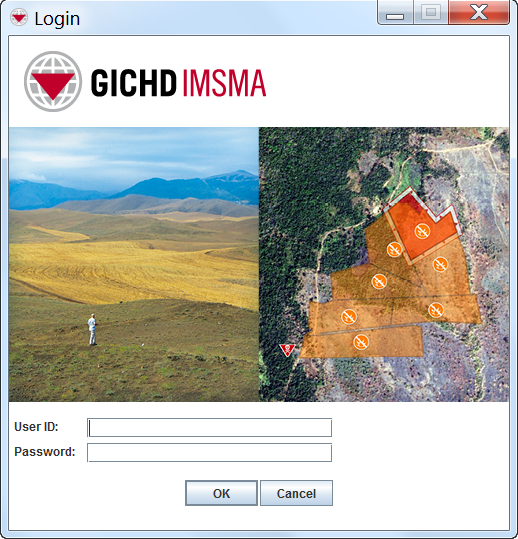
- If the user ID and password you entered are valid, the IMSMA Navigation Window displays.


|
The first time that the IMSMA client is started, it may take a few minutes for the IMSMA Navigation window to display. |
Log in errors
If you encounter an error during login, find below the explanation:

| Error message | Cause |
|---|---|
| Invalid ID or password. Please type a valid user ID and password. | The user ID or password that you entered is incorrect. |
| Unable to connect to the server. Please check your configuration settings. | Either the server has not been started or the client is configured incorrectly. Click on Show Detail to learn more. |
| User ID entered is not unique in user database. Please have an administrator remove the duplicate entry. | A user account with exactly same User ID has been added to the database. |
| You have entered an inactive User ID. Please enter an active User ID and password, or contact your system administrator for assistance. | The user account has been deactivated by an administrator. |
| You have entered an User ID without permissions. Please contact your system administrator for assistance. | The user account has not been included in a role. |
|
If you would like to view output messages from the server, select the Client tab from the Console Window menu. Check View the Server and/or Client Output Messages page. |
{{#switch:|subgroup|child=|none=|#default=
{{#if:|<th scope="col" style="border-left:2px solid #fdfdfd;width:100%;|}}{{#if:|{{#if:Using IMSMANG|}}}}{{#if:Display the IMSMA Control Centre Icon · IMSMA Client Configuration Tool · Start the IMSMA Server · Start IMSMA client · Exit IMSMA client · Stop the IMSMA Server · View the Server and/or Client Output Messages · Exit Control Centre|{{#if:Using IMSMANG|}}{{#if:|}}{{#if: Starting and Stopping IMSMANG|<td style="text-align:left;border-left-width:2px;border-left-style:solid;|{{#if:|}}}}{{#if:|{{#if:Using IMSMANGDisplay the IMSMA Control Centre Icon · IMSMA Client Configuration Tool · Start the IMSMA Server · Start IMSMA client · Exit IMSMA client · Stop the IMSMA Server · View the Server and/or Client Output Messages · Exit Control Centre|}}{{#if:|<td style="text-align:left;border-left-width:2px;border-left-style:solid;|}}{{#if:|{{#if:Using IMSMANGDisplay the IMSMA Control Centre Icon · IMSMA Client Configuration Tool · Start the IMSMA Server · Start IMSMA client · Exit IMSMA client · Stop the IMSMA Server · View the Server and/or Client Output Messages · Exit Control Centre|}}{{#if:|<td style="text-align:left;border-left-width:2px;border-left-style:solid;|}}{{#if:|{{#if:|<td style="text-align:left;border-left-width:2px;border-left-style:solid;|}}{{#if:|{{#if:|<td style="text-align:left;border-left-width:2px;border-left-style:solid;|}}{{#if:|{{#if:|<td style="text-align:left;border-left-width:2px;border-left-style:solid;|}}{{#if:|{{#if:|<td style="text-align:left;border-left-width:2px;border-left-style:solid;|}}{{#if:|{{#if:|<td style="text-align:left;border-left-width:2px;border-left-style:solid;|}}{{#if:|{{#if:|<td style="text-align:left;border-left-width:2px;border-left-style:solid;|}}{{#if:|{{#if:|<td style="text-align:left;border-left-width:2px;border-left-style:solid;|}}{{#if:|{{#if:|<td style="text-align:left;border-left-width:2px;border-left-style:solid;|}}{{#if:|{{#if:|<td style="text-align:left;border-left-width:2px;border-left-style:solid;|}}{{#if:|{{#if:|<td style="text-align:left;border-left-width:2px;border-left-style:solid;|}}{{#if:|{{#if:|<td style="text-align:left;border-left-width:2px;border-left-style:solid;|}}{{#if:|{{#if:|<td style="text-align:left;border-left-width:2px;border-left-style:solid;|}}{{#if:|{{#if:|<td style="text-align:left;border-left-width:2px;border-left-style:solid;|}}{{#if:|{{#if:|<td style="text-align:left;border-left-width:2px;border-left-style:solid;|}}{{#if:|{{#if:|<td style="text-align:left;border-left-width:2px;border-left-style:solid;|}}{{#if:|{{#if:|<td style="text-align:left;border-left-width:2px;border-left-style:solid;|}}{{#if:|{{#if:|<td style="text-align:left;border-left-width:2px;border-left-style:solid;|}}{{#if:|{{#if:Using IMSMANGDisplay the IMSMA Control Centre Icon · IMSMA Client Configuration Tool · Start the IMSMA Server · Start IMSMA client · Exit IMSMA client · Stop the IMSMA Server · View the Server and/or Client Output Messages · Exit Control Centre|}}}}| }}<table cellspacing="0" class="nowraplinks hlist {{#if:Using IMSMANG|{{#switch:autocollapse|plain|off=|#default=collapsible {{#if:autocollapse|autocollapse|autocollapse}}}}}} {{#switch:|subgroup|child|none=navbox-subgroup" style="border-spacing:0;;|#default=navbox-inner" style="border-spacing:0;background:transparent;color:inherit}};;">{{#if:Using IMSMANG| | ||||
{{{above}}} | ||||
{{{imageleft}}} | Starting and Stopping IMSMANG |
{{{image}}} | ||
| {{{group2}}} |
{{{list2}}} | |||
| {{{group3}}} |
{{{list3}}} | |||
| {{{group4}}} |
{{{list4}}} | |||
| {{{group5}}} |
{{{list5}}} | |||
| {{{group6}}} |
{{{list6}}} | |||
| {{{group7}}} |
{{{list7}}} | |||
| {{{group8}}} |
{{{list8}}} | |||
| {{{group9}}} |
{{{list9}}} | |||
| {{{group10}}} |
{{{list10}}} | |||
| {{{group11}}} |
{{{list11}}} | |||
| {{{group12}}} |
{{{list12}}} | |||
| {{{group13}}} |
{{{list13}}} | |||
| {{{group14}}} |
{{{list14}}} | |||
| {{{group15}}} |
{{{list15}}} | |||
| {{{group16}}} |
{{{list16}}} | |||
| {{{group17}}} |
{{{list17}}} | |||
| {{{group18}}} |
{{{list18}}} | |||
| {{{group19}}} |
{{{list19}}} | |||
| {{{group20}}} |
{{{list20}}} | |||
{{{below}}} | ||||
{{#switch:|subgroup|child=
|none=|#default=}}{{#ifeq:|Template|{{#ifeq:|child||{{#ifeq:|subgroup||{{#switch:log into imsma
|doc
|sandbox
|testcases =
|#default = {{#switch:hlist
 |plainlist
 |hlist
 |hlist hnum
 |hlist vcard
 |vcard hlist =
 |#default =
 }}
}}
}}}}}}