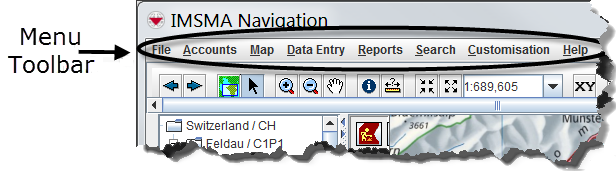
The menu toolbar displays at the top of the IMSMA Navigation window. The IMSMA menu options available to you depend on your permissions. Menu options to which you do not have access will be dimmed.
Menu Toolbar
Menu Toolbar
The following tables describe the IMSMA menus options.
Displays the map in its original scale and original position within the map pane, see Go to Home function.
Tools → Zoom To Full Extent
Displays the map with the furthest location defined in IMSMA, see Zoom to Full Extent.
Tools → Go to Coordinates
Displays the Recentre on Coordinates window that allows you to specify the latitude and longitude on which you would like to centre the map, see Go to Coordinates.
Map Display
Opens the Map Display Window where the IMSMA and map themes are controlled on how they look like in the map pane.
The Coordinate system function has moved to Customisation menu.
Data Entry Menu Options
Menu option
Description
Data Entry Forms
Opens the submenu for Data Entry of Item data.
Data Entry Forms → Add Data Entry Form
Allows you to fill out a new data entry form using an existing template. For more information, see Add a Data Entry Form.
Data Entry Forms → Workbench
Displays the current list of incomplete data entry forms, which you can view, edit, delete, and transfer to and from IMSMA. For more information, see Use the Data Entry Form Editor Window.
Allows you to add and change local ID generators. For more information, see Add a Local ID Generator.
Data Inventory Manager
Displays the complete list of fields used to populate data entry forms, and lets you create your own custom defined fields. For more information, see Data Inventory Manager.
Coordinate System Manager
Allows you to add, change, and delete coordinate reference systems used by IMSMA, see Add a Coordinate System.
Hierarchy Manager
Allows you to add, change, and delete country structure levels. For more information, see Hierarchy Manager.
Report Template Manager
Allows you to add, edit, export, and delete IMSMA iReport templates, as well as use them to create reports, see Manage Report Templates in IMSMA.
Sub-Themes Manager
Allows you to add customized item map themes in the Map Display. For more information, see Customise Sub-Themes.
Summary Manager
Allows you to design custom summary windows that display item data in different ways. For more information, see Summary Window.
User Preferences
Allows you to customise parts of the IMSMA GUI. For more information, see Setting User Preferences.
In version 6.0 the Administrator functions have been consolidated in the Customisation menu.