| How To |
|---|
|
{{#if:Add a New User
|
|}}{{#if:View and/or Change a User
|
|}}{{#if:Deactivate a User
|
|}}{{#if:|
- {{{4}}}|}}{{#if:|
- {{{5}}}|}}{{#if:|
- {{{6}}}|}}{{#if:|
- {{{7}}}|}}{{#if:|
- {{{8}}}|}}{{#if:|
- {{{9}}}|}}{{#if:|
- {{{10}}}|}}{{#if:|
- {{{11}}}|}}{{#if:|
- {{{12}}}|}}{{#if:|
- {{{13}}}|}}{{#if:|
- {{{14}}}|}}{{#if:|
- {{{15}}}|}}{{#if:|
- {{{16}}}|}}{{#if:|
- {{{17}}}|}}{{#if:|
- {{{18}}}|}}{{#if:|
- {{{19}}}|}}{{#if:|
- {{{20}}}|}}{{#if:|
- {{{21}}}|}}{{#if:|
- {{{22}}}|}}{{#if:|
- {{{23}}}|}}{{#if:|
- {{{24}}}|}}{{#if:|
- {{{25}}}|}}{{#if:|
- {{{26}}}|}}{{#if:|
- {{{27}}}|}}{{#if:|
- {{{28}}}|}}{{#if:|
- {{{29}}}|}}{{#if:|
- {{{30}}}|}}{{#if:|
- {{{31}}}|}}{{#if:|
- {{{32}}}|}}{{#if:|
- {{{33}}}|}}{{#if:|
- {{{34}}}|}}{{#if:|
- {{{35}}}|}}{{#if:|
- {{{36}}}|}}{{#if:|
- {{{37}}}|}}{{#if:|
- {{{38}}}|}}{{#if:|
- {{{39}}}|}}{{#if:|
- {{{40}}}|}}{{#if:|
- {{{41}}}|}}{{#if:|
- {{{42}}}|}}{{#if:|
- {{{43}}}|}}{{#if:|
- {{{44}}}|}}{{#if:|
- {{{45}}}|}}{{#if:|
- {{{46}}}|}}{{#if:|
- {{{47}}}|}}{{#if:|
- {{{48}}}|}}{{#if:|
- {{{49}}}|}}{{#if:|
- {{{50}}}|}}
|
To view and/or change a user:
- From the Accounts menu, select Users.
- The User List window displays.
- Click the name of the user that you would like to view or change.
- Click the File:Pencil.png button.
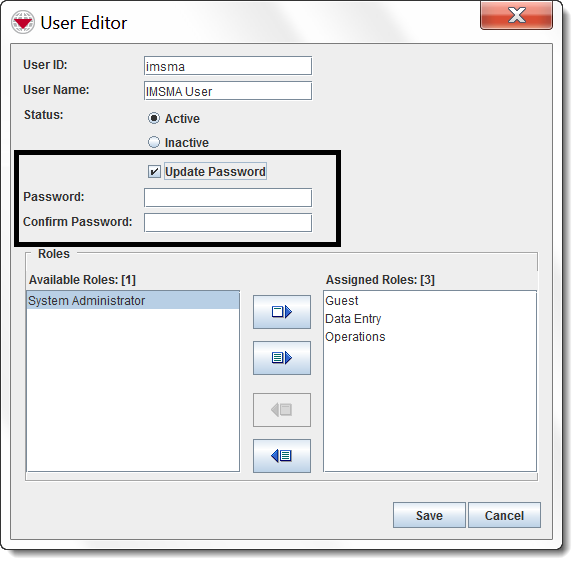
- The User Editor window displays the selected user.
- Change the information as needed. If you would like to change the password:
- Check the Update Password checkbox.
- Enter the password in the Password and Confirm Password fields.
- Do one of the following actions.
- To save the user, click the Save button.
- If the user is changed successfully, the user displays in the User List window.
- To discard any changes to the role and close the User Editor window, click the Cancel button.

