The IMSMA Navigation window immediately displays at the launch of the system.
The IMSMA Navigation window has three panes: the country structure pane, the map pane and the items pane. The three panes work together. Users can browse through elements of any pane to view additional data appropriate to the kind of data the other panes hold.
The items pane displays most recently approved information. Each item has its own current view window that can be opened to browse for linked information and historic details. Throughout IMSMANG, functions and features display in smaller windows over the IMSMA Navigation window.
Interacting with Panes
- Selecting the country structure area of your choice
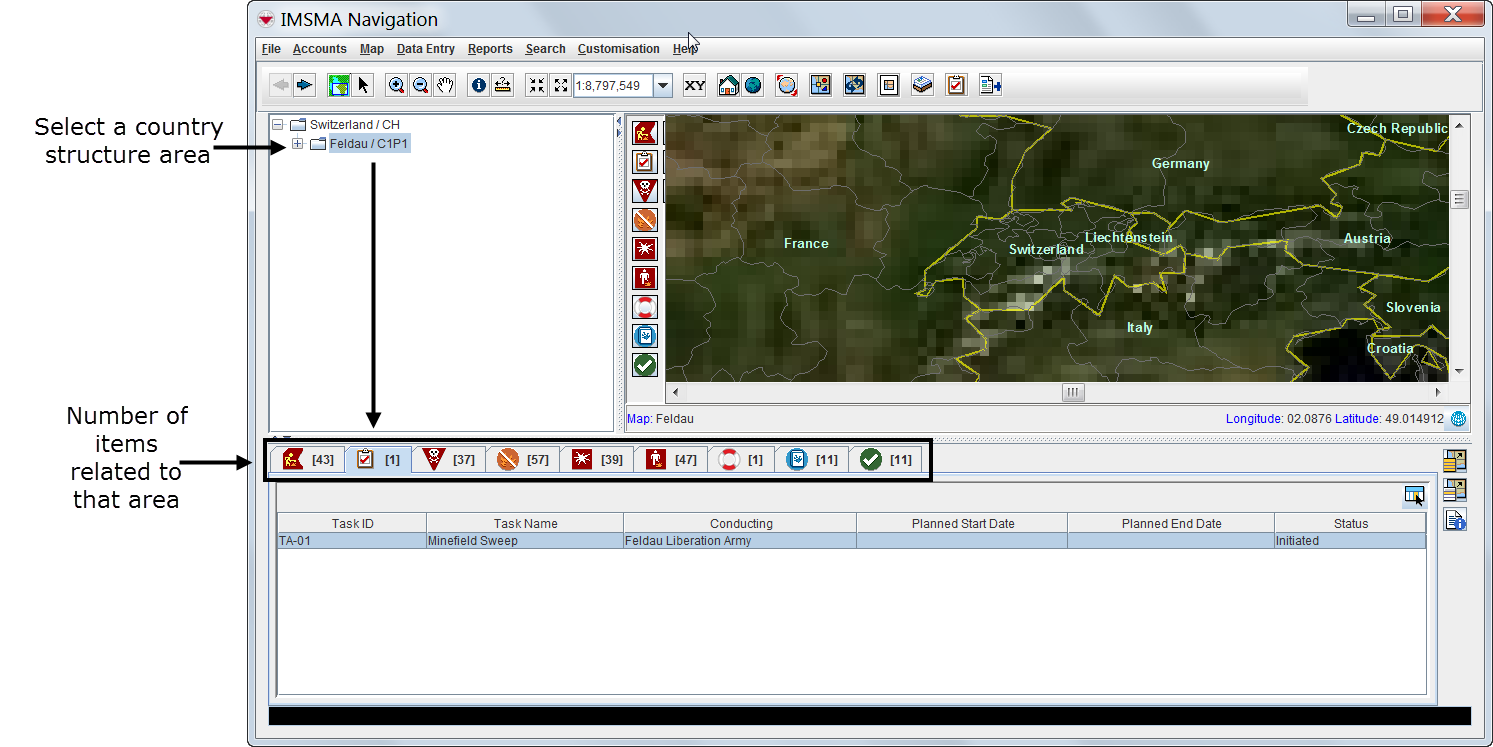
- Displaying items on the map
- File:VaB02.png
- Identifying an item from the map
- File:VaB04.png
Viewing Additional Data on the Map
- File:VaB05.png
- File:VaB06.png
- Displaying items by subcategories
- File:VaB07.png
- Displaying auxiliary data
- File:VaB08.png
- File:VaB09.png
Browsing the Items Pane
Rearranging Displayed Items
- File:VaB10.png
Displaying New Column Headings
- File:VaB11.png
Viewing a Specific Item Current View Window
- File:VaB12.png
Viewing Linked Items of the Selected Item

Viewing Historic Details
- File:VaB14.png
Browsing Locations
- File:VaB15.png
Browsing Tasks
- File:VaB16.png
Viewing Auxiliary Data Lists
- Choose Data entry > select an auxiliary data type.
- File:VaB17.png
- File:VaB18.png
- File:VaB19.png


