Viewing and Browsing in IMSMANG: Difference between revisions
No edit summary |
No edit summary |
||
| Line 4: | Line 4: | ||
===Interacting with Panes=== | ===Interacting with Panes=== | ||
{{HowTo's | {{HowTo's | ||
|[[HowTo: Display Item Records in the Items Pane|Display Item Records in the Items Pane]] | |[[HowTo:Display Item Records in the Items Pane|Display Item Records in the Items Pane]] | ||
|[[ | |[[Country Structure Pane|Display Records for a Country Structure Area]] | ||
|[[HowTo: Expand a Country Structure Area Node|Expand a Country Structure Area Node]] | |[[HowTo:Expand a Country Structure Area Node|Expand a Country Structure Area Node]] | ||
|[[HowTo: Collapse a Country Structure Area Node|Collapse a Country Structure Area Node]] | |[[HowTo:Collapse a Country Structure Area Node|Collapse a Country Structure Area Node]] | ||
|[[HowTo: HowTo Display the Icons of Item Records on the Map | HowTo Display the Icons of Item Records on the Map]] | |[[HowTo:HowTo Display the Icons of Item Records on the Map | HowTo Display the Icons of Item Records on the Map]] | ||
|[[HowTo: Display Geospatial Data for an Item Record on the Map|Display Geospatial Data for an Item Record on the Map]] | |[[HowTo:Display Geospatial Data for an Item Record on the Map|Display Geospatial Data for an Item Record on the Map]] | ||
|[[HowTo: Display Data for a Selected Item Record|Display Data for a Selected Item Record]] | |[[HowTo:Display Data for a Selected Item Record|Display Data for a Selected Item Record]] | ||
|[[HowTo: Identify Selected Item Records and Icons|Identify Selected Item Records and Icons]] | |[[HowTo:Identify Selected Item Records and Icons|Identify Selected Item Records and Icons]] | ||
}} | }} | ||
| Line 33: | Line 33: | ||
===Viewing Additional Data on the Map=== | ===Viewing Additional Data on the Map=== | ||
{{HowTo's | {{HowTo's | ||
|[[HowTo: Enable an IMSMA Theme | Enable an IMSMA Theme]] | |[[HowTo:Enable an IMSMA Theme | Enable an IMSMA Theme]] | ||
|[[HowTo: Change IMSMA Theme Display Properties |Change IMSMA Theme Display Properties]] | |[[HowTo:Change IMSMA Theme Display Properties |Change IMSMA Theme Display Properties]] | ||
|[[HowTo: Change the Display Order of IMSMA Themes| Change the Display Order of IMSMA Themes]] | |[[HowTo:Change the Display Order of IMSMA Themes| Change the Display Order of IMSMA Themes]] | ||
|[[HowTo: Display the Item Icon on the Map from the Current View|Display the Item Icon on the Map from the Current View]] | |[[HowTo:Display the Item Icon on the Map from the Current View|Display the Item Icon on the Map from the Current View]] | ||
|[[HowTo: View the Previous and Next Map in the Series|View the Previous and Next Map in the Series]] | |[[HowTo:View the Previous and Next Map in the Series|View the Previous and Next Map in the Series]] | ||
|[[HowTo: Select Icons on the Map|Select Icons on the Map]] | |[[HowTo:Select Icons on the Map|Select Icons on the Map]] | ||
|[[HowTo: Display the Area and length of a polygon|Display the Area and length of a polygon]] | |[[HowTo:Display the Area and length of a polygon|Display the Area and length of a polygon]] | ||
|[[HowTo: Identify Objects on the Map | Identify Objects on the Map]] | |[[HowTo:Identify Objects on the Map | Identify Objects on the Map]] | ||
|[[HowTo: Measure Distance on the Map | Measure Distance on the Map]] | |[[HowTo:Measure Distance on the Map | Measure Distance on the Map]] | ||
|[[HowTo: Reposition the Map Image | Reposition the Map Image]] | |[[HowTo:Reposition the Map Image | Reposition the Map Image]] | ||
|[[HowTo: Lasso an area on the Map | Lasso an area on the Map]] | |[[HowTo:Lasso an area on the Map | Lasso an area on the Map]] | ||
|[[HowTo: Zoom in on and Recentre the Map | Zoom in on and Recentre the Map]] | |[[HowTo:Zoom in on and Recentre the Map | Zoom in on and Recentre the Map]] | ||
|[[HowTo: Change the Map Scale | Change the Map Scale]] | |[[HowTo:Change the Map Scale | Change the Map Scale]] | ||
|[[HowTo: Display the Map at a Larger Scale | Display the Map at a Larger Scale]] | |[[HowTo:Display the Map at a Larger Scale | Display the Map at a Larger Scale]] | ||
|[[HowTo: Display the Map at a Smaller Scale | Display the Map at a Smaller Scale]] | |[[HowTo:Display the Map at a Smaller Scale | Display the Map at a Smaller Scale]] | ||
|[[HowTo: Recentre the Map to Coordinates | Recentre the Map to Coordinates]] | |[[HowTo:Recentre the Map to Coordinates | Recentre the Map to Coordinates]] | ||
|[[HowTo: Display the Original Map View | Display the Original Map View]] | |[[HowTo:Display the Original Map View | Display the Original Map View]] | ||
|[[HowTo: Change the Map Projection | Change the Map Projection]] | |[[HowTo:Change the Map Projection | Change the Map Projection]] | ||
|[[HowTo: Display the Full Extent | Display the Full Extent]] | |[[HowTo:Display the Full Extent | Display the Full Extent]] | ||
|[[HowTo: Change the Coordinate Reference System Display| Change the Coordinate Reference System Display]] | |[[HowTo:Change the Coordinate Reference System Display| Change the Coordinate Reference System Display]] | ||
|[[HowTo: Refresh the Map | Refresh the Map]] | |[[HowTo:Refresh the Map | Refresh the Map]] | ||
|[[HowTo: Control the Page Layout | Control the Page Layout]] | |[[HowTo:Control the Page Layout | Control the Page Layout]] | ||
|[[HowTo: Control the Coordinate Display|Control the Coordinate Display]] | |[[HowTo:Control the Coordinate Display|Control the Coordinate Display]] | ||
}} | }} | ||
:*Using the map tools | :*Using the map tools | ||
| Line 91: | Line 91: | ||
{{HowTo's | {{HowTo's | ||
|[[HowTo: Display the Item Icon on the Map from the Current View |Display the Item Icon on the Map from the Current View ]] | |[[HowTo: Display the Item Icon on the Map from the Current View |Display the Item Icon on the Map from the Current View ]] | ||
|[[HowTo: Display the Item Associated Location View|Display the Item Associated Location View]] | |[[HowTo:Display the Item Associated Location View|Display the Item Associated Location View]] | ||
|[[HowTo: Display Data for a Selected Item Record from a Location View|Display Data for a Selected Item Record from a Location View]] | |[[HowTo:Display Data for a Selected Item Record from a Location View|Display Data for a Selected Item Record from a Location View]] | ||
}} | }} | ||
| Line 117: | Line 117: | ||
====Browsing Locations==== | ====Browsing Locations==== | ||
{{HowTo's | {{HowTo's | ||
|[[HowTo: Display Data for a Selected Item Record from a Location View|Display Data for a Selected Item Record from a Location View]] | |[[HowTo:Display Data for a Selected Item Record from a Location View|Display Data for a Selected Item Record from a Location View]] | ||
|[[HowTo: Change the Status of a Selected Item Record | Change the Status of a Selected Item Record]] | |[[HowTo:Change the Status of a Selected Item Record | Change the Status of a Selected Item Record]] | ||
}} | }} | ||
Revision as of 16:19, 30 August 2012
Interacting with Panes
| How To |
|---|
|
{{#if:Display Item Records in the Items Pane | |}}{{#if:Display Records for a Country Structure Area | |}}{{#if:Expand a Country Structure Area Node | |}}{{#if:Collapse a Country Structure Area Node | |}}{{#if: HowTo Display the Icons of Item Records on the Map | |}}{{#if:Display Geospatial Data for an Item Record on the Map | |}}{{#if:Display Data for a Selected Item Record | |}}{{#if:Identify Selected Item Records and Icons | |}}{{#if:|
|
- Selecting the country structure area of your choice
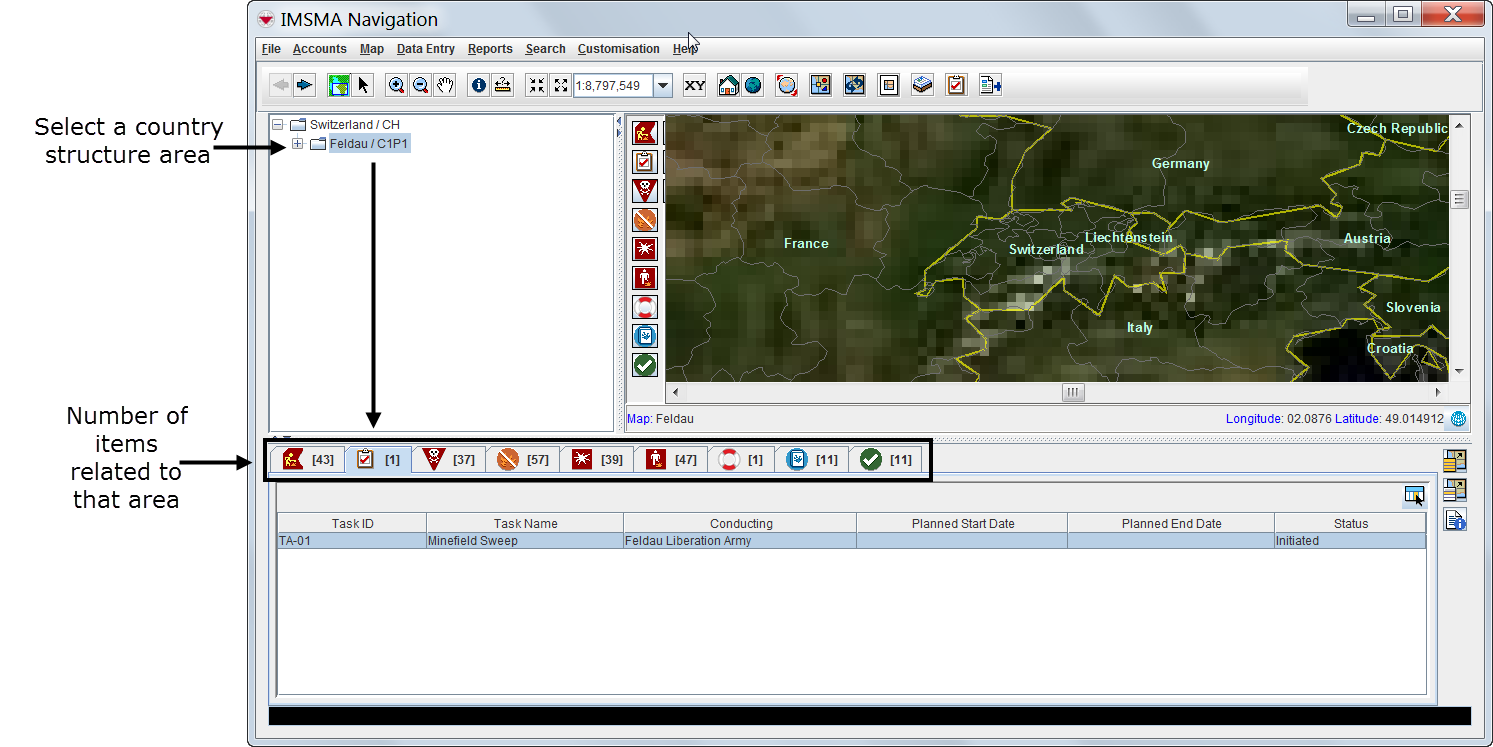

- Displaying items on the map
- File:VaB02.png
| Represents a tip or note for using IMSMA Mobile. | Items with a grey background in the items pane do not have geographic coordinates and they cannot be displayed on the map. |
| File:VaB03.png | |
- Identifying an item from the map
Viewing Additional Data on the Map
| How To |
|---|
|
{{#if: Enable an IMSMA Theme | |}}{{#if:Change IMSMA Theme Display Properties | |}}{{#if: Change the Display Order of IMSMA Themes | |}}{{#if:Display the Item Icon on the Map from the Current View | |}}{{#if:View the Previous and Next Map in the Series | |}}{{#if:Select Icons on the Map | |}}{{#if:Display the Area and length of a polygon | |}}{{#if: Identify Objects on the Map | |}}{{#if: Measure Distance on the Map | |}}{{#if: Reposition the Map Image | |}}{{#if: Lasso an area on the Map | |}}{{#if: Zoom in on and Recentre the Map | |}}{{#if: Change the Map Scale | |}}{{#if: Display the Map at a Larger Scale | |}}{{#if: Display the Map at a Smaller Scale | |}}{{#if: Recentre the Map to Coordinates | |}}{{#if: Display the Original Map View | |}}{{#if: Change the Map Projection | |}}{{#if: Display the Full Extent | |}}{{#if: Change the Coordinate Reference System Display | |}}{{#if: Refresh the Map | |}}{{#if: Control the Page Layout | |}}{{#if:Control the Coordinate Display | |}}{{#if:|
|
- Using the map tools
| Represents a tip or note for using IMSMA Mobile. | Using the map tools activates the map status bar in the bottom of the IMSMA Navigation window. |
- Displaying items by subcategories
- File:VaB07.png
- Displaying auxiliary data
- Displaying labels
Browsing the Items Pane
Rearranging Displayed Items
Displaying New Column Headings
Viewing a Specific Item Current View Window
| How To |
|---|
|
{{#if:Display the Item Icon on the Map from the Current View | |}}{{#if:Display the Item Associated Location View | |}}{{#if:Display Data for a Selected Item Record from a Location View | |}}{{#if:|
|
| Represents a tip or note for using IMSMA Mobile. | Current view windows can be customised and may present different tabs and summary headings. Contact your local administrator if you cannot find the links table. |
Viewing Linked Items of the Selected Item


| Represents a tip or note for using IMSMA Mobile. | Links reflect the reconciliation steps performed before the approval of the selected item. For more details on reconciling and approving data, see Reconciling and Approving Data in IMSMANG. |
Viewing Historic Details

Browsing Locations
| How To |
|---|
|
{{#if:Display Data for a Selected Item Record from a Location View | |}}{{#if: Change the Status of a Selected Item Record | |}}{{#if:|
|

Browsing Tasks

| Represents a tip or note for using IMSMA Mobile. | Tasks do not display in current view windows. |
Viewing Auxiliary Data Lists
| How To |
|---|
|
{{#if:Filter the Explosive Ordnance List | |}}{{#if: Filter the Organisation List | |}}{{#if: Filter the Place List | |}}{{#if:|
|
- Choose Data entry > select an auxiliary data type.


| Represents a tip or note for using IMSMA Mobile. | Lists of auxiliary data provide direct access for adding new data or editing existing data. |