Check Attachments: Difference between revisions
Jump to navigation
Jump to search
No edit summary |
No edit summary |
||
| Line 9: | Line 9: | ||
[[Image:Check attachment1.png|700px|center]] | [[Image:Check attachment1.png|700px|center]] | ||
<li> Now the field ''guid'' table ''test'' should be populated. The value is part of the file name and therefore the UPDATE query has to be run for each case. | <li> Now the field ''guid'' table ''test'' should be populated. The value is part of the file name and therefore the UPDATE query has to be run for each case. | ||
:'''Example query''' | |||
<pre> | |||
UPDATE test | |||
SET | |||
guid = substring(f1 from (position('0a' in f1) ) for 37) | |||
WHERE | |||
(((( length(f1) - length(replace(f1, '.', ''))) = 4))) | |||
AND | |||
left(substring(f1 from (position('0a' in f1) ) for 37),2) = '0a' AND | |||
substring(f1 from (position('0a' in f1) ) for 37) not like '%.%' | |||
AND guid is NULL | |||
</pre> | |||
<li>Then compare the tables ''attachment'' and ''test'' | |||
:'''Found in both''' (in my example 2034) | |||
<pre> | |||
SELECT | |||
"public".attachment.filename, | |||
"public".test.f1 | |||
FROM | |||
"public".attachment | |||
INNER JOIN "public".test ON "public".attachment.attachment_guid = "public".test.guid | |||
</pre> | |||
:'''Missing in the folder''' (in my example 2731) | |||
<pre> | |||
SELECT | |||
"public".attachment.filename, | |||
"public".test.f1 | |||
FROM | |||
"public".attachment | |||
LEFT JOIN "public".test ON "public".attachment.attachment_guid = "public".test.guid | |||
WHERE | |||
"public".test.guid IS NULL | |||
</pre> | |||
:'''Missing in the table''' (in my example 6625) | |||
<pre> | |||
6625 | |||
</pre> | |||
</ol> | </ol> | ||
[[Category:NoPublic]] | [[Category:NoPublic]] | ||
{{NavBox Hub}} | {{NavBox Hub}} | ||
Revision as of 15:12, 9 November 2016
In this example there are 4765 rows in the attachment table and there are 8660 files in the C:\IMSMAng\server\attachments folder.
- Open the Command window and navigate to C:\IMSMAng\server\attachments folder.
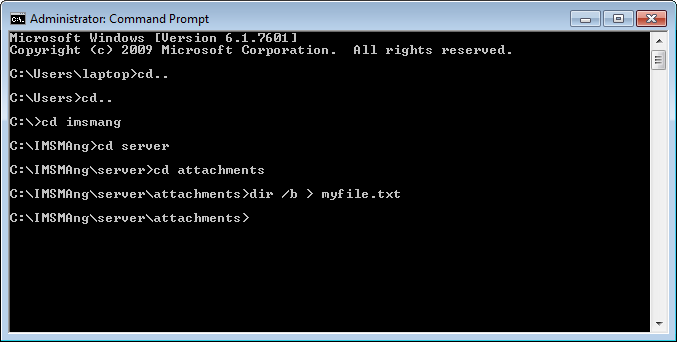
- List the file names with the command dir /b > myfile.txt
- Use Navicat and import the file myfile.txt to table test
- If needed delete the row with myfile.txt from the table test.
- Add field guid to table test (varchar 38).
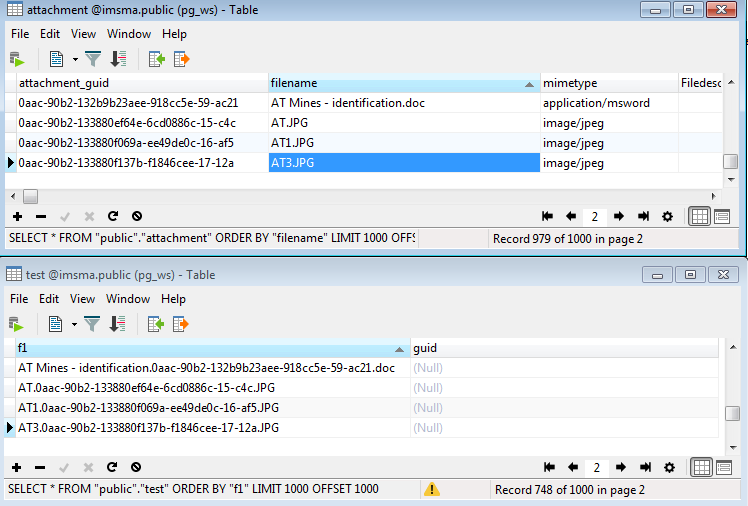
- Now the field guid table test should be populated. The value is part of the file name and therefore the UPDATE query has to be run for each case.
- Example query
UPDATE test SET guid = substring(f1 from (position('0a' in f1) ) for 37) WHERE (((( length(f1) - length(replace(f1, '.', ''))) = 4))) AND left(substring(f1 from (position('0a' in f1) ) for 37),2) = '0a' AND substring(f1 from (position('0a' in f1) ) for 37) not like '%.%' AND guid is NULL - Then compare the tables attachment and test
- Found in both (in my example 2034)
SELECT
"public".attachment.filename,
"public".test.f1
FROM
"public".attachment
INNER JOIN "public".test ON "public".attachment.attachment_guid = "public".test.guid
- Missing in the folder (in my example 2731)
SELECT
"public".attachment.filename,
"public".test.f1
FROM
"public".attachment
LEFT JOIN "public".test ON "public".attachment.attachment_guid = "public".test.guid
WHERE
"public".test.guid IS NULL
- Missing in the table (in my example 6625)
6625

