How to Unblock IMSMA server: Difference between revisions
Jump to navigation
Jump to search
Created page with "When a user by mistake has clicked on the '''Block''' button during IMSMA server start-up you may unblock it in the Windows Firewall. <ol> <li> Go to the Control panel and ch..." |
No edit summary |
||
| Line 9: | Line 9: | ||
<li>Click Change settings. | <li>Click Change settings. | ||
<li>Unblock the IMSMA server and click OK. | <li>Unblock the IMSMA server and click OK. | ||
</ol> | |||
{{NavBox Hub}} | {{NavBox Hub}} | ||
[[Category:NoPublic]] | [[Category:NoPublic]] | ||
[[Category:NAA]] | [[Category:NAA]] | ||
Revision as of 14:26, 12 February 2015
When a user by mistake has clicked on the Block button during IMSMA server start-up you may unblock it in the Windows Firewall.
- Go to the Control panel and choose Windows Firewall.
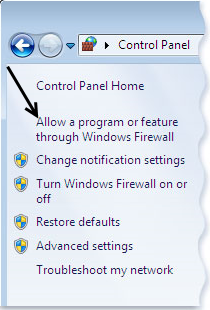
- In the left pane, click Allow a program or feature through Windows Firewall.
- Scroll down to Java(TM) Platform SE binary
- Click on the Detail button until you find C:\imsmang\java\bin\javaw.exe
- Click Change settings.
- Unblock the IMSMA server and click OK.
