Local ID Generator Window: Difference between revisions
Jump to navigation
Jump to search
No edit summary |
No edit summary |
||
| (15 intermediate revisions by 4 users not shown) | |||
| Line 1: | Line 1: | ||
Item ID number series are managed through the Local ID Generator window. | |||
[[Image: | <ol> | ||
<li>In the '''Customisation''' menu → '''Data Entry Form Templates''' → '''Local ID Generator'''. | |||
<li>The Local ID Generator window displays a list of item ID number series defined. | |||
[[Image:LocalIDGeneratorWindow.png|center|500px|''Local ID Generator Window'']] | |||
<div align="center"> | <div align="center"> | ||
''Local ID | ''Local ID Generator Window'' | ||
</div> | </div> | ||
</ol> | |||
{{note| The [[File:FieldViewIcon.png|20px]] button is only available after you have selected a local ID generator from the list.}} | |||
{{NavBox HowTo ID Generator}} | |||
[[Category:NAA]] | |||
Latest revision as of 23:15, 17 June 2017
Item ID number series are managed through the Local ID Generator window.
- In the Customisation menu → Data Entry Form Templates → Local ID Generator.
- The Local ID Generator window displays a list of item ID number series defined.
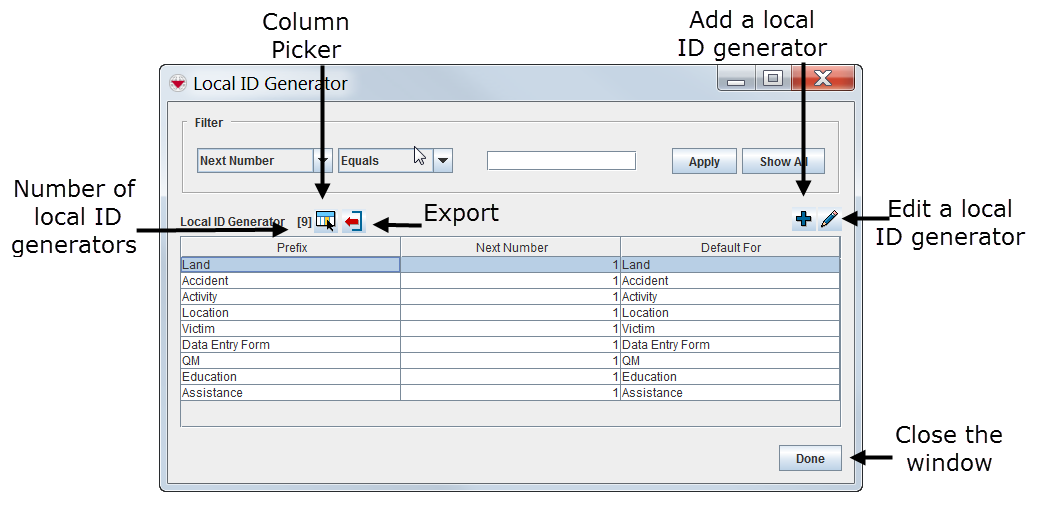
Local ID Generator Window Local ID Generator Window

 |
The  button is only available after you have selected a local ID generator from the list. button is only available after you have selected a local ID generator from the list.
|
{{#switch:|subgroup|child=|none=|#default=
{{#if:|<th scope="col" style="border-left:2px solid #fdfdfd;width:100%;|}}{{#if:|{{#if:Customising IMSMANG|}}}}{{#if:Local ID Generator Window · Filter the Local IDs Displayed · Add a Local ID Generator · View or Change a Local ID Generator|{{#if:Customising IMSMANG|}}{{#if:|}}{{#if:Configuring the Items ID Generator|<td style="text-align:left;border-left-width:2px;border-left-style:solid;|{{#if:|}}}}{{#if:|{{#if:Customising IMSMANGLocal ID Generator Window · Filter the Local IDs Displayed · Add a Local ID Generator · View or Change a Local ID Generator|}}{{#if:|<td style="text-align:left;border-left-width:2px;border-left-style:solid;|}}{{#if:|{{#if:Customising IMSMANGLocal ID Generator Window · Filter the Local IDs Displayed · Add a Local ID Generator · View or Change a Local ID Generator|}}{{#if:|<td style="text-align:left;border-left-width:2px;border-left-style:solid;|}}{{#if:|{{#if:|<td style="text-align:left;border-left-width:2px;border-left-style:solid;|}}{{#if:|{{#if:|<td style="text-align:left;border-left-width:2px;border-left-style:solid;|}}{{#if:|{{#if:|<td style="text-align:left;border-left-width:2px;border-left-style:solid;|}}{{#if:|{{#if:|<td style="text-align:left;border-left-width:2px;border-left-style:solid;|}}{{#if:|{{#if:|<td style="text-align:left;border-left-width:2px;border-left-style:solid;|}}{{#if:|{{#if:|<td style="text-align:left;border-left-width:2px;border-left-style:solid;|}}{{#if:|{{#if:|<td style="text-align:left;border-left-width:2px;border-left-style:solid;|}}{{#if:|{{#if:|<td style="text-align:left;border-left-width:2px;border-left-style:solid;|}}{{#if:|{{#if:|<td style="text-align:left;border-left-width:2px;border-left-style:solid;|}}{{#if:|{{#if:|<td style="text-align:left;border-left-width:2px;border-left-style:solid;|}}{{#if:|{{#if:|<td style="text-align:left;border-left-width:2px;border-left-style:solid;|}}{{#if:|{{#if:|<td style="text-align:left;border-left-width:2px;border-left-style:solid;|}}{{#if:|{{#if:|<td style="text-align:left;border-left-width:2px;border-left-style:solid;|}}{{#if:|{{#if:|<td style="text-align:left;border-left-width:2px;border-left-style:solid;|}}{{#if:|{{#if:|<td style="text-align:left;border-left-width:2px;border-left-style:solid;|}}{{#if:|{{#if:|<td style="text-align:left;border-left-width:2px;border-left-style:solid;|}}{{#if:|{{#if:|<td style="text-align:left;border-left-width:2px;border-left-style:solid;|}}{{#if:|{{#if:Customising IMSMANGLocal ID Generator Window · Filter the Local IDs Displayed · Add a Local ID Generator · View or Change a Local ID Generator|}}}}| }}<table cellspacing="0" class="nowraplinks hlist {{#if:Customising IMSMANG|{{#switch:autocollapse|plain|off=|#default=collapsible {{#if:autocollapse|autocollapse|autocollapse}}}}}} {{#switch:|subgroup|child|none=navbox-subgroup" style="border-spacing:0;;|#default=navbox-inner" style="border-spacing:0;background:transparent;color:inherit}};;">{{#if:Customising IMSMANG| | ||||
{{{above}}} | ||||
{{{imageleft}}} | Configuring the Items ID Generator |
{{{image}}} | ||
| {{{group2}}} |
{{{list2}}} | |||
| {{{group3}}} |
{{{list3}}} | |||
| {{{group4}}} |
{{{list4}}} | |||
| {{{group5}}} |
{{{list5}}} | |||
| {{{group6}}} |
{{{list6}}} | |||
| {{{group7}}} |
{{{list7}}} | |||
| {{{group8}}} |
{{{list8}}} | |||
| {{{group9}}} |
{{{list9}}} | |||
| {{{group10}}} |
{{{list10}}} | |||
| {{{group11}}} |
{{{list11}}} | |||
| {{{group12}}} |
{{{list12}}} | |||
| {{{group13}}} |
{{{list13}}} | |||
| {{{group14}}} |
{{{list14}}} | |||
| {{{group15}}} |
{{{list15}}} | |||
| {{{group16}}} |
{{{list16}}} | |||
| {{{group17}}} |
{{{list17}}} | |||
| {{{group18}}} |
{{{list18}}} | |||
| {{{group19}}} |
{{{list19}}} | |||
| {{{group20}}} |
{{{list20}}} | |||
{{{below}}} | ||||
{{#switch:|subgroup|child=
|none=|#default=}}{{#ifeq:|Template|{{#ifeq:|child||{{#ifeq:|subgroup||{{#switch:local id generator window
|doc
|sandbox
|testcases =
|#default = {{#switch:hlist
 |plainlist
 |hlist
 |hlist hnum
 |hlist vcard
 |vcard hlist =
 |#default =
 }}
}}
}}}}}}