Display the Map Layout Shapes Toolbar
Jump to navigation
Jump to search
Clicking the  button on the page layout toolbar displays the layout shapes toolbar.
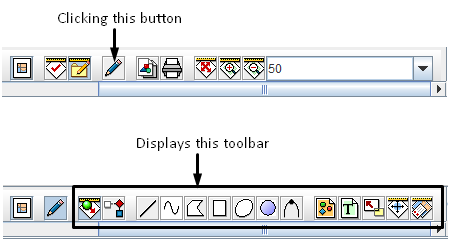
Edit Page Layout Toolbar
The edit page layout toolbar allows you to add shapes, text, and images to the page layout of the map. The buttons available on the toolbar are listed below.
| Edit Page Layout Toolbar Buttons | |
| Button | Description |
 |
Allows you to select objects on the page layout. By selecting certain objects (such as the map legend), you can drag them to a new position. |
 |
Deletes the selected object. |
 |
Allows you to draw a straight line in the print area. |
 |
Allows you to draw freehand in the print area. |
 |
Allows you to draw a polygon in the print area. |
 |
Allows you to draw a rectangle in the print area. |
 |
Allows you to draw an oval in the print area. |
 |
Allows you to draw a circle in the print area. |
 |
Allows you to draw a polycurve in the print area. |
 |
Allows you to add an image to the print area. |
 |
Allows you to add text to the print area. |
 |
Allows you to add a scale indicator to the print area. |
 |
Allows you to add a north indicator to the print area. |
 |
Allows you to add a legend to the print area. |
Category: